> ## Documentation Index
> Fetch the complete documentation index at: https://docs.runconverge.com/llms.txt
> Use this file to discover all available pages before exploring further.
# Meta Ads (Facebook Ads)
> An introduction to the Meta Ads marketing source
export const Icon = ({name}) => {
return
;
};
The Meta Ads marketing source allows you to see platform-specific metrics (e.g. Ad Spend) in Converge.
To send data from Converge to Meta, check out the [Meta Ads Destination](/destinations/integrations/facebook) instead.
## Set up the Marketing source
1. Navigate to the [Marketing Sources Tab](https://app.runconverge.com/-/ad-platforms) in your Converge dashboard.
2. Click on **Connect a new ad platform** and then choose **Facebook**.
3. Name your ad platform sync: e.g. `Facebook Ads | {Ad Account ID}` and then press **continue with Facebook**.
4. Once the Facebook account has been linked, you can **select your Facebook Ads account**.
5. After pressing **Create** your Facebook metrics will stream into Converge.
***
## Converge functionality
This integration supports the following Converge marketing source functionality.
| Converge Feature | Supported |
| ------------------------------------------------------------------------------------------------------------------------------------------------------------------------------------------------------------ | --------------------- |
| Sync Frequency | Every 5 minutes |
| Hourly Spend Breakdowns | |
| Custom Conversions | |
***
## Set up your tracking parameters
1. Navigate to your Facebook Ads Manager.
2. Navigate to the ad you'll set up tracking for. Click on **Edit**.
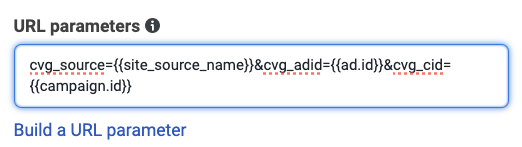
3. Scroll down to the **Tracking** section. There's a field called **URL parameters**. Paste in the following snippet.
```
cvg_source={{site_source_name}}&cvg_adid={{ad.id}}&cvg_cid={{campaign.id}}
```
4. Repeat steps 1-3 for **every ad you run**, but **you can also bulk edit all your ads at once**.
Changing the URL parameters will put the ad back into a processing state, which may last up to an hour. **In rare cases, the social proof of the ad could be reset** and the ad sent back into the learning phase.
If you want your tracking parameters to be compatible with **both** the Converge and [Google Analytics 4](/destinations/integrations/ga4) attribution report, use the following template instead
```
utm_source=facebook&utm_medium=paid&utm_campaign={{campaign.name}}&utm_content={{ad.name}}&cvg_source={{site_source_name}}&cvg_adid={{ad.id}}&cvg_cid={{campaign.id}}
```
***
## Supported metrics
We support a variety of metrics to help you analyze your ad performance on Meta Ads. Click on each category to expand and see the specific metrics available.
The Attribution Overview Report provides a high-level snapshot of your ad performance, including efficiency and engagement metrics.
| Metric | Description |
| --------------- | ------------------------------------------------------------------------------- |
| **Ad Spend** | The total amount of money spent on your Meta ads. |
| **ROAS** | The attributed revenue generated for every unit of currency spent on Meta ads. |
| **CTR** | The average percentage of people who clicked on your Meta ad after seeing it. |
| **CPA** | The average cost associated with actions from your Meta ads. |
| **CPC** | The average cost per click on your Meta ads. |
| **CPM** | The average cost per thousand impressions of your Meta ads. |
| **Conversions** | The number of Meta-attributed purchases that happened because of your Meta ads. |
| **Clicks** | The total number of clicks on your Meta ads. |
| **Impressions** | The number of times your Meta ads were on-screen. |
The Channels Report tab provides a detailed comparison of performance metrics across advertising channels, campaigns, ad sets, and ads, helping you understand the most effective elements.
| Metric | Description |
| ------------- | ---------------------------------------------------------------- |
| **Purchases** | The total number of purchases as attributed by Meta to Meta ads. |
| **Revenue** | The total revenue generated as attributed by Meta to Meta ads. |
| **ROAS** | The return on ad spend as attributed by Meta to Meta ads. |
| **CPA** | The cost of acquiring a conversion as attributed by Meta. |
| **Ad Spend** | The total expenditure on Meta Advertising. |
 4. Repeat steps 1-3 for **every ad you run**, but **you can also bulk edit all your ads at once**.