> ## Documentation Index
> Fetch the complete documentation index at: https://docs.runconverge.com/llms.txt
> Use this file to discover all available pages before exploring further.

# Tapjoy Ads

> An introduction to the Tapjoy marketing source

export const OutboundLink = ({linkText, linkTarget}) => {
  return <a target="_blank" href={linkTarget}> {linkText} 
    <div className="inline h-3 w-3 fill-gray-500 dark:fill-gray-100 text-gray-500 dark:text-gray-300 ml-1 mr-1">
      <svg className="inline w-2.5 h-2.5 bg-gray-500 dark:bg-gray-300" style={{
    maskImage: `url('https://mintlify.b-cdn.net/v6.5.1/solid/up-right-from-square.svg')`,
    maskRepeat: "no-repeat",
    maskPosition: "center center"
  }}></svg> 
    </div>
    </a>;
};

export const IconText = ({name, text, iconSource = "mintlify", iconLocation = "before", iconType = "solid"}) => {
  const sourceUrl = iconSource === 'local' ? `url('/images/icons/${name}.svg')` : `url('https://mintlify.b-cdn.net/v6.5.1/${iconType}/${name}.svg')`;
  return <>
            <div className="inline-block pl-2">
                {iconLocation === 'before' && <div className="h-3.5 w-3.5 fill-gray-800 dark:fill-gray-100 text-gray-800 dark:text-gray-100 inline-block align-middle mr-2">
                        <svg className="w-4 h-4 bg-gray-800 dark:bg-gray-100 " style={{
    maskImage: sourceUrl,
    maskRepeat: "no-repeat",
    maskPosition: "center center"
  }} />
                    </div>}
                <span className="inline-block align-middle font-semibold fill-gray-800 dark:fill-gray-100 text-gray-800 dark:text-gray-100 pl-1 pr-2">{text}</span>
                {iconLocation === 'after' && <div className="h-3.5 w-3.5 fill-gray-800 dark:fill-gray-100 text-gray-800 dark:text-gray-100 inline-block align-middle mr-2">
                        <svg className="w-4 h-4 bg-gray-800 dark:bg-gray-100 pr-3" style={{
    maskImage: sourceUrl,
    maskRepeat: "no-repeat",
    maskPosition: "center center"
  }} />
                    </div>}
            </div>
        </>;
};

export const Icon = ({name}) => {
  return <div className="h-4 w-4 fill-gray-800 dark:fill-gray-100 text-gray-800 dark:text-gray-100 inline-block align-middle">
            <svg className="w-4 h-4 bg-gray-800 dark:bg-gray-100" style={{
    maskImage: `url('https://mintlify.b-cdn.net/v6.5.1/solid/${name}.svg')`,
    maskRepeat: "no-repeat",
    maskPosition: "center center"
  }} />
        </div>;
};

<Note>
  The Tapjoy marketing source allows you to see platform-specific metrics
  (e.g. Ad Spend) in Converge.
</Note>

## Set up the Marketing source

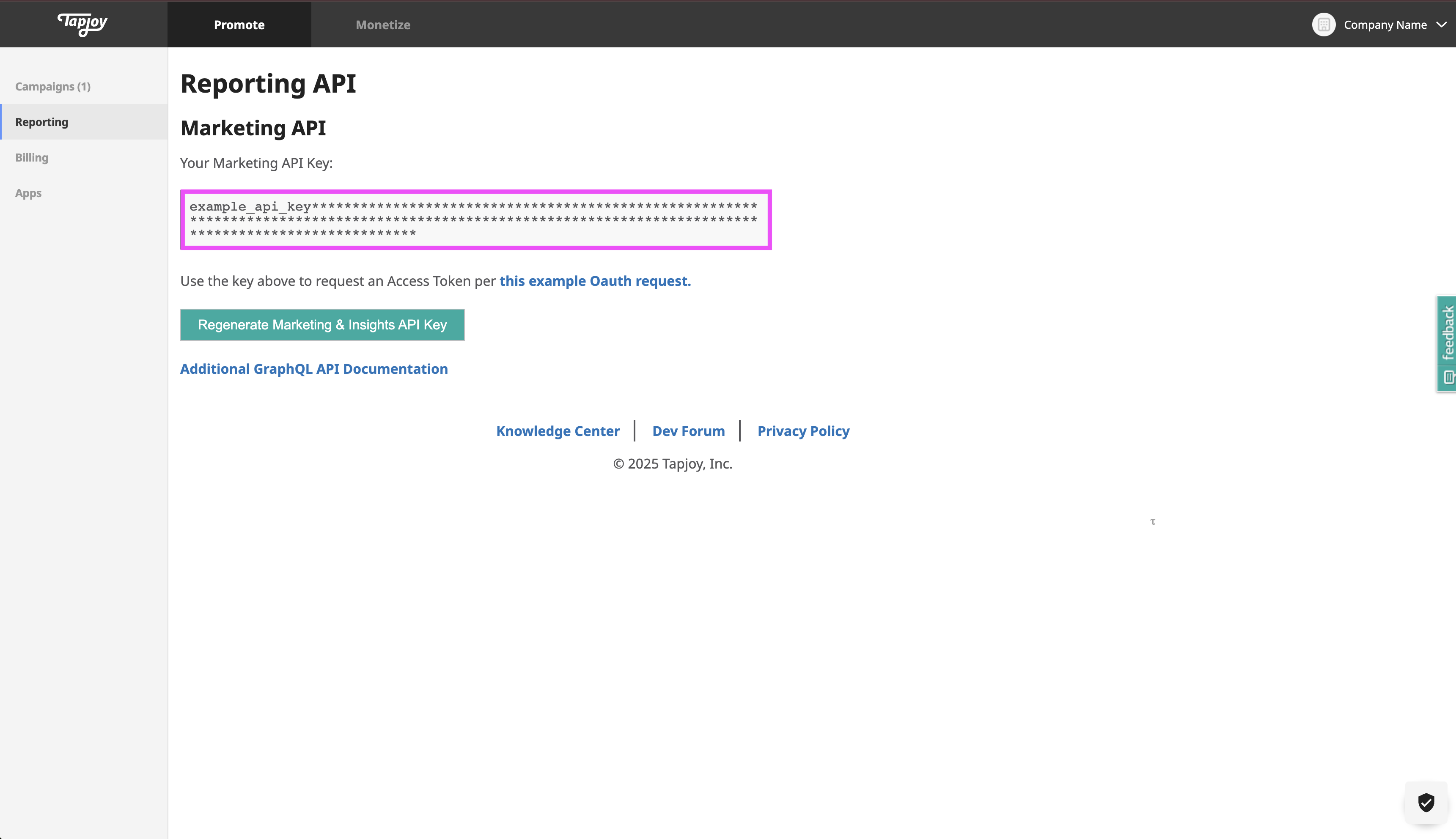
1. Navigate to your <OutboundLink linkText="Tapjoy reporting dashboard" linkTarget="https://dashboard.tapjoy.com/dashboard/reporting/api" />.

2. Copy your **Marketing API Key**.

<Frame>
  <img src="https://mintcdn.com/converge/jqdxrbHdidXe9kgB/images/ad-platforms/tapjoy/tapjoy-marketing-api-key.png?fit=max&auto=format&n=jqdxrbHdidXe9kgB&q=85&s=23a8952e1d45887d15a518264757f2e3" alt="Tapjoy Marketing API Key" width="3442" height="1984" data-path="images/ad-platforms/tapjoy/tapjoy-marketing-api-key.png" />
</Frame>

3. In the Converge dashboard, navigate to the [Marketing Sources Tab](https://app.runconverge.com/-/ad-platforms).

4. Click on **Connect a new ad platform** and then choose **Tapjoy**.

5. Name your ad platform sync: e.g. `Tapjoy Ad Account`.

6. Fill in the **Marketing API Key** you copied from **Tapjoy** in *Step 2*.

7. After pressing **Create** your Tapjoy metrics will stream into Converge.

***

## Converge functionality

This integration supports the following Converge marketing source functionality.

| Converge Feature                                                                                                                                                                                             | Supported             |
| ------------------------------------------------------------------------------------------------------------------------------------------------------------------------------------------------------------ | --------------------- |
| Sync Frequency                                                                                                                                                                                               | Every hour            |
| <Tooltip tip="Whether spend is available on a per-hour basis. When unsupported, Converge pulls in the daily spend and uniformly distributes it over the hours of the day.">Hourly Spend Breakdowns</Tooltip> | <Icon name="xmark" /> |
| Custom Conversions                                                                                                                                                                                           | <Icon name="xmark" /> |

***

## Supported metrics

We support a variety of metrics to help you analyze your ad performance on Tapjoy. Click on each category to expand and see the specific metrics available.

<AccordionGroup>
  <Accordion icon="chart-column" title="Overview Report">
    The Attribution Overview Report provides a high-level snapshot of your ad performance, including efficiency and engagement metrics.

    | Metric          | Description                                                                  |
    | --------------- | ---------------------------------------------------------------------------- |
    | **Ad Spend**    | The total amount of money spent on your ads.                                 |
    | **ROAS**        | The attributed revenue generated for every unit of currency spent on ads.    |
    | **CTR**         | The average percentage of people who clicked on your ads after seeing them.  |
    | **CPA**         | The average cost associated with actions from your ads.                      |
    | **CPC**         | The average cost per click on your ads.                                      |
    | **CPM**         | The average cost per thousand impressions of your ads.                       |
    | **Conversions** | The number of Tapjoy-attributed purchases that happened because of your ads. |
    | **Clicks**      | The total number of clicks on your ads.                                      |
    | **Impressions** | The number of times your ads were on-screen.                                 |
  </Accordion>

  <Accordion icon="network-wired" title="Channels Report">
    The Channels Report tab provides a detailed comparison of performance metrics across advertising channels, campaigns, ad sets, and ads, helping you understand the most effective elements.

    | Metric          | Description                                                            |
    | --------------- | ---------------------------------------------------------------------- |
    | **Purchases**   | The total number of purchases as attributed by Tapjoy to Tapjoy ads.   |
    | **Impressions** | The total number of impressions as attributed by Tapjoy to Tapjoy ads. |
    | **Clicks**      | The total number of clicks as attributed by Tapjoy to Tapjoy ads.      |
    | **Conversions** | The total number of conversions as attributed by Tapjoy.               |
    | **Ad Spend**    | The total expenditure on Tapjoy Advertising.                           |
  </Accordion>
</AccordionGroup>
