> ## Documentation Index
> Fetch the complete documentation index at: https://docs.runconverge.com/llms.txt
> Use this file to discover all available pages before exploring further.

# BigQuery

> Setting up a destination with BigQuery

export const OutboundLink = ({linkText, linkTarget}) => {
  return <a target="_blank" href={linkTarget}> {linkText} 
    <div className="inline h-3 w-3 fill-gray-500 dark:fill-gray-100 text-gray-500 dark:text-gray-300 ml-1 mr-1">
      <svg className="inline w-2.5 h-2.5 bg-gray-500 dark:bg-gray-300" style={{
    maskImage: `url('https://mintlify.b-cdn.net/v6.5.1/solid/up-right-from-square.svg')`,
    maskRepeat: "no-repeat",
    maskPosition: "center center"
  }}></svg> 
    </div>
    </a>;
};

export const IconText = ({name, text, iconSource = "mintlify", iconLocation = "before", iconType = "solid"}) => {
  const sourceUrl = iconSource === 'local' ? `url('/images/icons/${name}.svg')` : `url('https://mintlify.b-cdn.net/v6.5.1/${iconType}/${name}.svg')`;
  return <>
            <div className="inline-block pl-2">
                {iconLocation === 'before' && <div className="h-3.5 w-3.5 fill-gray-800 dark:fill-gray-100 text-gray-800 dark:text-gray-100 inline-block align-middle mr-2">
                        <svg className="w-4 h-4 bg-gray-800 dark:bg-gray-100 " style={{
    maskImage: sourceUrl,
    maskRepeat: "no-repeat",
    maskPosition: "center center"
  }} />
                    </div>}
                <span className="inline-block align-middle font-semibold fill-gray-800 dark:fill-gray-100 text-gray-800 dark:text-gray-100 pl-1 pr-2">{text}</span>
                {iconLocation === 'after' && <div className="h-3.5 w-3.5 fill-gray-800 dark:fill-gray-100 text-gray-800 dark:text-gray-100 inline-block align-middle mr-2">
                        <svg className="w-4 h-4 bg-gray-800 dark:bg-gray-100 pr-3" style={{
    maskImage: sourceUrl,
    maskRepeat: "no-repeat",
    maskPosition: "center center"
  }} />
                    </div>}
            </div>
        </>;
};

export const Icon = ({name}) => {
  return <div className="h-4 w-4 fill-gray-800 dark:fill-gray-100 text-gray-800 dark:text-gray-100 inline-block align-middle">
            <svg className="w-4 h-4 bg-gray-800 dark:bg-gray-100" style={{
    maskImage: `url('https://mintlify.b-cdn.net/v6.5.1/solid/${name}.svg')`,
    maskRepeat: "no-repeat",
    maskPosition: "center center"
  }} />
        </div>;
};

<Warning>
  The data warehouse destinations are currently in <strong>beta</strong>.
  Several features are either missing or subject to change in the future. While
  in <strong>testing</strong>, the product is provided <em>as is</em> and its usage
  is <strong>free of charge</strong>. This <strong>will change</strong> in the future
  once the product has been stabilized and released, after which the product will
  be <strong>billed separately</strong>.

  Please reach out to support if you have
  any questions or issues while testing the data warehouse destinations.
</Warning>

## Installation instructions

<Steps>
  <Step icon="table" title="1. Create service account in Google Cloud">
    1. Log into your Google Cloud console at <OutboundLink linkText="console.cloud.google.com" linkTarget="https://console.cloud.google.com" />

    2. Choose your relevant Google Cloud Project from the top bar. If you don't have a Google Cloud Project yet, you can create one following the instructions [here](https://developers.google.com/workspace/guides/create-project).

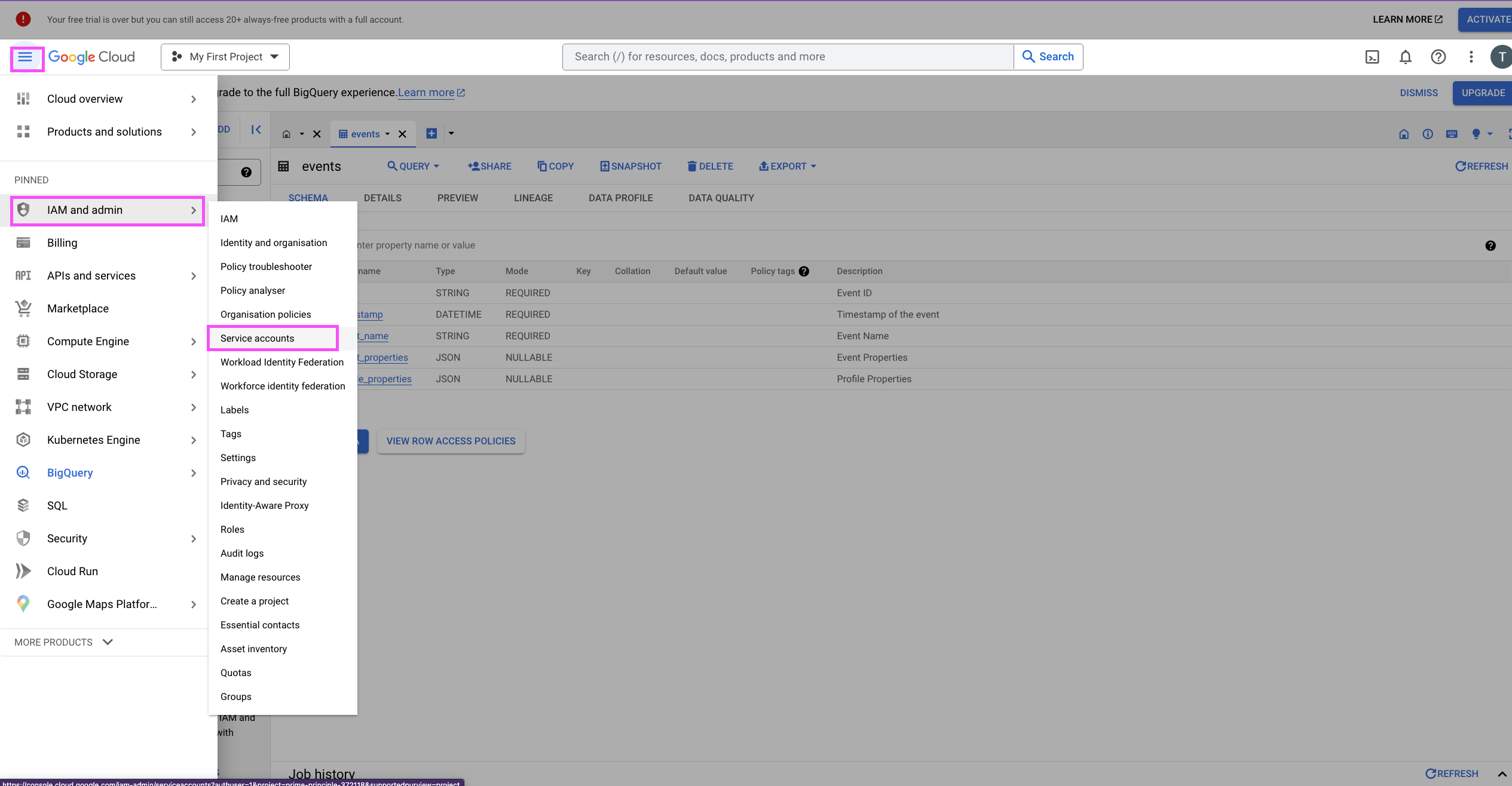
    3. In the sidebar menu, choose *IAM and admin* > *Service accounts*.
        
           <Frame>
             <img src="https://mintcdn.com/converge/jqdxrbHdidXe9kgB/images/data-warehouse/bigquery/bigq_service_1.png?fit=max&auto=format&n=jqdxrbHdidXe9kgB&q=85&s=3788f1b5013c66f42777db0a9f0ac966" alt="bq-s-1" width="2530" height="1316" data-path="images/data-warehouse/bigquery/bigq_service_1.png" />
           </Frame>

    4. Click on **Create Service Account**.
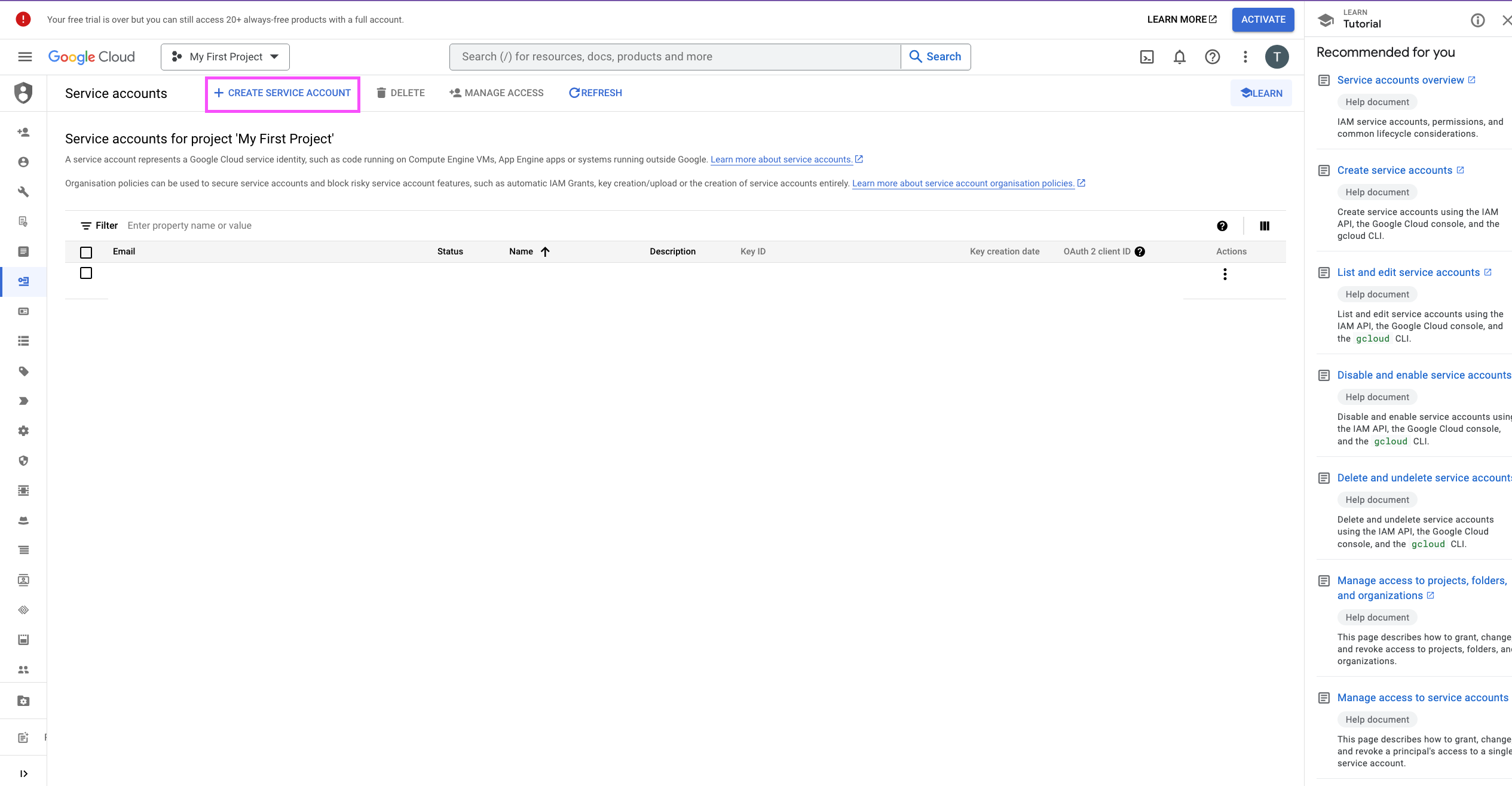
        
           <Frame>
             <img src="https://mintcdn.com/converge/jqdxrbHdidXe9kgB/images/data-warehouse/bigquery/bigq_service_2.png?fit=max&auto=format&n=jqdxrbHdidXe9kgB&q=85&s=9649901ae2f1dd5f10b81ff8deedd08d" alt="bq-s-2" width="2530" height="1316" data-path="images/data-warehouse/bigquery/bigq_service_2.png" />
           </Frame>

    5. Fill in service account name, e.g. `converge-bigq-account` and click on **Create and continue**.
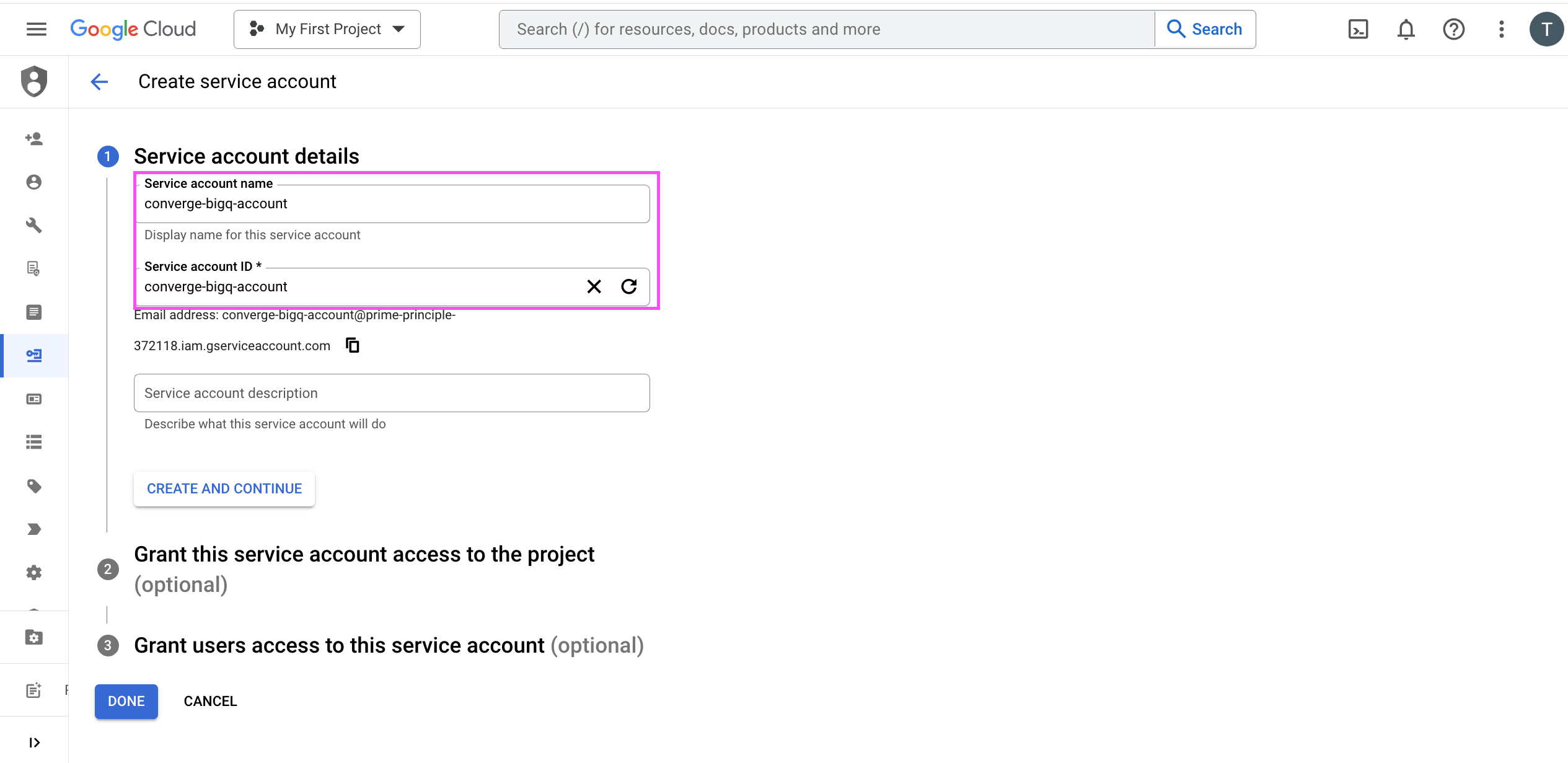
        

    <Frame>
      <img src="https://mintcdn.com/converge/jqdxrbHdidXe9kgB/images/data-warehouse/bigquery/bigq_service_3.png?fit=max&auto=format&n=jqdxrbHdidXe9kgB&q=85&s=be2d0cec6730cb4f513ce223bc0c1860" alt="bq-s-3" width="2530" height="1231" data-path="images/data-warehouse/bigquery/bigq_service_3.png" />
    </Frame>

    11. Under *Grant this service account access to the project*, choose the **BigQuery Data Owner** and **BigQuery Job User** scopes and click on **Done**.
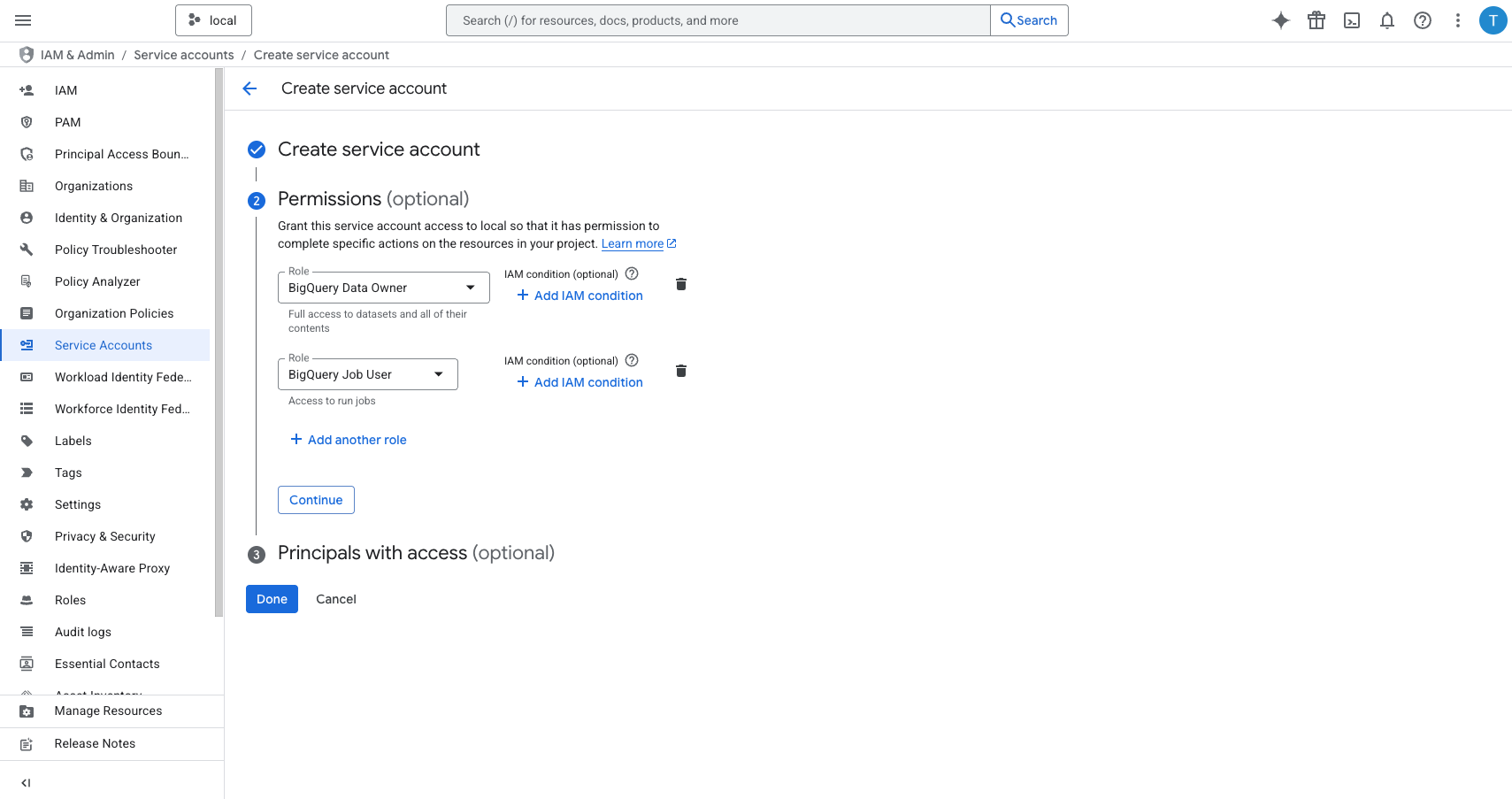
         

    <Frame>
      <img src="https://mintcdn.com/converge/jqdxrbHdidXe9kgB/images/data-warehouse/bigquery/bigq_service_4.png?fit=max&auto=format&n=jqdxrbHdidXe9kgB&q=85&s=e158269474a2c94c344d47760414d08b" alt="bq-s-4" width="1709" height="903" data-path="images/data-warehouse/bigquery/bigq_service_4.png" />
    </Frame>

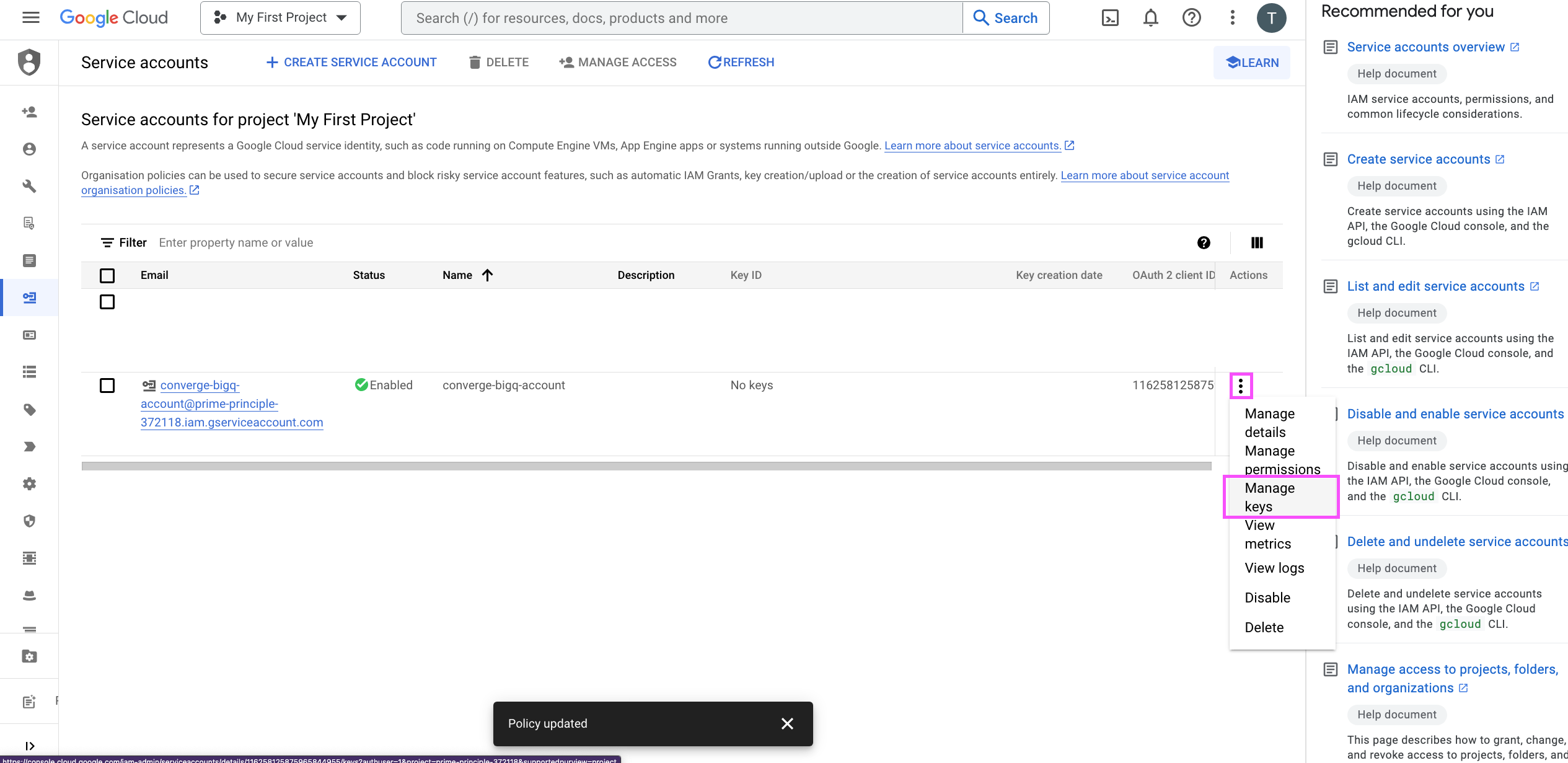
    12. Pick your newly created service account from the list of Service Accounts and choose **Manage keys**.
         

    <Frame>
      <img src="https://mintcdn.com/converge/jqdxrbHdidXe9kgB/images/data-warehouse/bigquery/bigq_service_5.png?fit=max&auto=format&n=jqdxrbHdidXe9kgB&q=85&s=a50e47a61d8d98f0be341c6b7e2a7c9b" alt="bq-s-5" width="2530" height="1231" data-path="images/data-warehouse/bigquery/bigq_service_5.png" />
    </Frame>

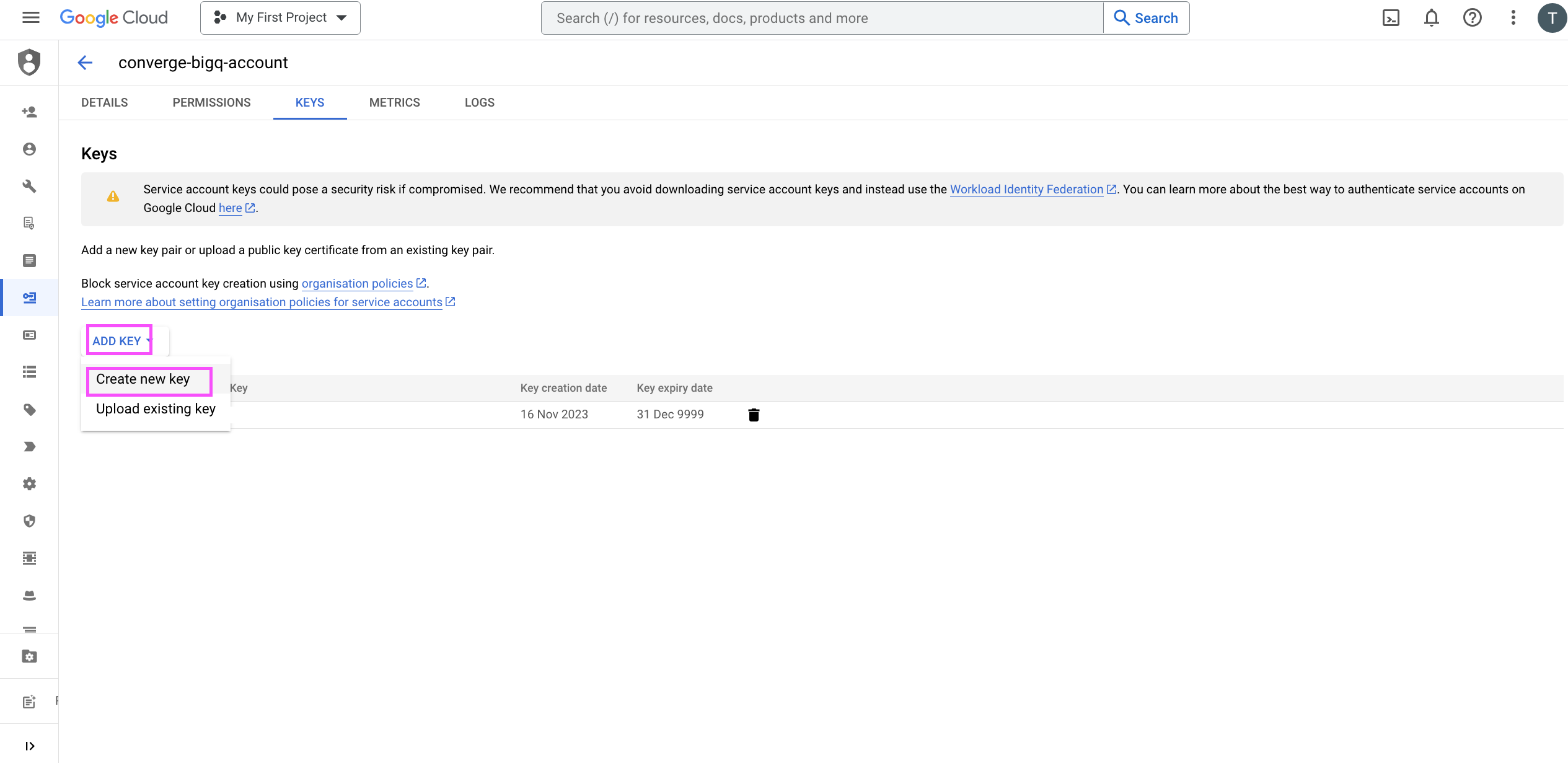
    13. Click on **Add Key** and **Create new key**. In the popup choose **JSON** and click on **Create**. This will download a file that ends with `.json`.
         

    <Frame>
      <img src="https://mintcdn.com/converge/jqdxrbHdidXe9kgB/images/data-warehouse/bigquery/bigq_service_6.png?fit=max&auto=format&n=jqdxrbHdidXe9kgB&q=85&s=61da7a661b9d69b5f0cdabba1c715e06" alt="bq-s-6" width="2530" height="1231" data-path="images/data-warehouse/bigquery/bigq_service_6.png" />
    </Frame>
  </Step>

  <Step icon="bars-staggered" title="2. Send Converge Data to your BigQuery table">
    14. In the Converge sidebar, click on <IconText name="cloud-arrow-up" text="Data warehouse" /> and then click **Connect data warehouse**.
    15. Select the **BigQuery** destination and click **Next**.
    16. Give your destination a **name** (e.g. BigQuery Data Warehouse) and click **Next**.
    17. Click the **Credentials** field and select the `.json` file containing your service account key created in step 13.
    18. Fill in the **Dataset ID** with the dataset ID from **Google Cloud**.
    19. Fill in the **Table ID** with the table ID you'd like to send data. This table should not exist in BigQuery yet as it will be updated by the destination.
    20. In *Advanced configuration*, you can optionally fill in the **Staging Table ID**, if you would like to use a different table name. By default, Converge will use the same table name as the **Table ID** but with a `_staging` suffix.
    21. Click **Next**.
    22. Fill in the **Start date** with a date in the past from which you'd like to send data. Click **Next**.
    23. Review any issues and click **Connect data warehouse**.

    Converge will now start sending data to your BigQuery table.
  </Step>
</Steps>

***

## Data sent to BigQuery

Converge will send attributed data to BigQuery aggregated by day and ad. The following columns are currently sent to BigQuery:

| Column name in BigQuery                         | Type     | Description                                                                                                      | Attribution model                                        |
| ----------------------------------------------- | -------- | ---------------------------------------------------------------------------------------------------------------- | -------------------------------------------------------- |
| `date`                                          | `DATE`   | The date of the breakdown                                                                                        | N/A                                                      |
| `channel`                                       | `STRING` | The attributed channel                                                                                           | N/A                                                      |
| `campaign`                                      | `STRING` | The attributed campaign                                                                                          | N/A                                                      |
| `campaign_name`                                 | `STRING` | The name of the attributed campaign                                                                              | N/A                                                      |
| `adset`                                         | `STRING` | The attributed ad set                                                                                            | N/A                                                      |
| `adset_name`                                    | `STRING` | The name of the attributed ad set                                                                                | N/A                                                      |
| `ad`                                            | `STRING` | The attributed ad                                                                                                | N/A                                                      |
| `ad_name`                                       | `STRING` | The name of the attributed ad                                                                                    | N/A                                                      |
| `spend_sum`                                     | `FLOAT`  | The total spend for the day, as reported by the ad platform (if available for the channel)                       | N/A                                                      |
| `clicks_sum`                                    | `FLOAT`  | The total clicks for the day, as reported by the ad platform (if available for the channel)                      | N/A                                                      |
| `impressions_sum`                               | `FLOAT`  | The total impressions for the day, as reported by the ad platform (if available for the channel)                 | N/A                                                      |
| `purchase_conversions_sum`                      | `FLOAT`  | The total purchase conversions for the day, as reported by the ad platform (if available for the channel)        | N/A                                                      |
| `purchase_conversions_revenue`                  | `FLOAT`  | The total purchase conversion revenue for the day, as reported by the ad platform (if available for the channel) | N/A                                                      |
| `sessions_direct_session`                       | `FLOAT`  | The total number of sessions attributed by Converge                                                              | N/A                                                      |
| `placed_order_events_direct_session`            | `FLOAT`  | The total number of Placed Order events attributed by Converge                                                   | [Direct](/attribution/models#direct)                     |
| `placed_order_revenue_sum_direct_session`       | `FLOAT`  | The total revenue for Placed Order events attributed by Converge                                                 | [Direct](/attribution/models#direct)                     |
| `new_customer_order_events_direct_session`      | `FLOAT`  | The total number of New Customer Order events attributed by Converge                                             | [Direct](/attribution/models#direct)                     |
| `new_customer_order_revenue_sum_direct_session` | `FLOAT`  | The total revenue for New Customer Order events attributed by Converge                                           | [Direct](/attribution/models#direct)                     |
| `placed_order_events_first_touch`               | `FLOAT`  | The total number of Placed Order events attributed by Converge                                                   | [First Touch](/attribution/models#first-touch)           |
| `placed_order_revenue_sum_first_touch`          | `FLOAT`  | The total revenue for Placed Order events attributed by Converge                                                 | [First Touch](/attribution/models#first-touch)           |
| `new_customer_order_events_first_touch`         | `FLOAT`  | The total number of New Customer Order events attributed by Converge                                             | [First Touch](/attribution/models#first-touch)           |
| `new_customer_order_revenue_sum_first_touch`    | `FLOAT`  | The total revenue for New Customer Order events attributed by Converge                                           | [First Touch](/attribution/models#first-touch)           |
| `placed_order_events_inv_j_shaped`              | `FLOAT`  | The total number of Placed Order events attributed by Converge                                                   | [Inverse J Shaped](/attribution/models#inverse-j-shaped) |
| `placed_order_revenue_sum_inv_j_shaped`         | `FLOAT`  | The total revenue for Placed Order events attributed by Converge                                                 | [Inverse J Shaped](/attribution/models#inverse-j-shaped) |
| `new_customer_order_events_inv_j_shaped`        | `FLOAT`  | The total number of New Customer Order events attributed by Converge                                             | [Inverse J Shaped](/attribution/models#inverse-j-shaped) |
| `new_customer_order_revenue_sum_inv_j_shaped`   | `FLOAT`  | The total revenue for New Customer Order events attributed by Converge                                           | [Inverse J Shaped](/attribution/models#inverse-j-shaped) |
| `placed_order_events_j_shaped`                  | `FLOAT`  | The total number of Placed Order events attributed by Converge                                                   | [J Shaped](/attribution/models#j-shaped)                 |
| `placed_order_revenue_sum_j_shaped`             | `FLOAT`  | The total revenue for Placed Order events attributed by Converge                                                 | [J Shaped](/attribution/models#j-shaped)                 |
| `new_customer_order_events_j_shaped`            | `FLOAT`  | The total number of New Customer Order events attributed by Converge                                             | [J Shaped](/attribution/models#j-shaped)                 |
| `new_customer_order_revenue_sum_j_shaped`       | `FLOAT`  | The total revenue for New Customer Order events attributed by Converge                                           | [J Shaped](/attribution/models#j-shaped)                 |
| `placed_order_events_last_touch`                | `FLOAT`  | The total number of Placed Order events attributed by Converge                                                   | [Last Touch](/attribution/models#last-touch)             |
| `placed_order_revenue_sum_last_touch`           | `FLOAT`  | The total revenue for Placed Order events attributed by Converge                                                 | [Last Touch](/attribution/models#last-touch)             |
| `new_customer_order_events_last_touch`          | `FLOAT`  | The total number of New Customer Order events attributed by Converge                                             | [Last Touch](/attribution/models#last-touch)             |
| `new_customer_order_revenue_sum_last_touch`     | `FLOAT`  | The total revenue for New Customer Order events attributed by Converge                                           | [Last Touch](/attribution/models#last-touch)             |
| `placed_order_events_linear`                    | `FLOAT`  | The total number of Placed Order events attributed by Converge                                                   | [Linear](/attribution/models#linear)                     |
| `placed_order_revenue_sum_linear`               | `FLOAT`  | The total revenue for Placed Order events attributed by Converge                                                 | [Linear](/attribution/models#linear)                     |
| `new_customer_order_events_linear`              | `FLOAT`  | The total number of New Customer Order events attributed by Converge                                             | [Linear](/attribution/models#linear)                     |
| `new_customer_order_revenue_sum_linear`         | `FLOAT`  | The total revenue for New Customer Order events attributed by Converge                                           | [Linear](/attribution/models#linear)                     |
| `placed_order_events_participation`             | `FLOAT`  | The total number of Placed Order events attributed by Converge                                                   | [Participation](/attribution/models#participation)       |
| `placed_order_revenue_sum_participation`        | `FLOAT`  | The total revenue for Placed Order events attributed by Converge                                                 | [Participation](/attribution/models#participation)       |
| `new_customer_order_events_participation`       | `FLOAT`  | The total number of New Customer Order events attributed by Converge                                             | [Participation](/attribution/models#participation)       |
| `new_customer_order_revenue_sum_participation`  | `FLOAT`  | The total revenue for New Customer Order events attributed by Converge                                           | [Participation](/attribution/models#participation)       |
| `placed_order_events_time_decay`                | `FLOAT`  | The total number of Placed Order events attributed by Converge                                                   | [Time Decay](/attribution/models#time-decay)             |
| `placed_order_revenue_sum_time_decay`           | `FLOAT`  | The total revenue for Placed Order events attributed by Converge                                                 | [Time Decay](/attribution/models#time-decay)             |
| `new_customer_order_events_time_decay`          | `FLOAT`  | The total number of New Customer Order events attributed by Converge                                             | [Time Decay](/attribution/models#time-decay)             |
| `new_customer_order_revenue_sum_time_decay`     | `FLOAT`  | The total revenue for New Customer Order events attributed by Converge                                           | [Time Decay](/attribution/models#time-decay)             |
| `placed_order_events_u_shaped`                  | `FLOAT`  | The total number of Placed Order events attributed by Converge                                                   | [U Shaped](/attribution/models#u-shaped)                 |
| `placed_order_revenue_sum_u_shaped`             | `FLOAT`  | The total revenue for Placed Order events attributed by Converge                                                 | [U Shaped](/attribution/models#u-shaped)                 |
| `new_customer_order_events_u_shaped`            | `FLOAT`  | The total number of New Customer Order events attributed by Converge                                             | [U Shaped](/attribution/models#u-shaped)                 |
| `new_customer_order_revenue_sum_u_shaped`       | `FLOAT`  | The total revenue for New Customer Order events attributed by Converge                                           | [U Shaped](/attribution/models#u-shaped)                 |
