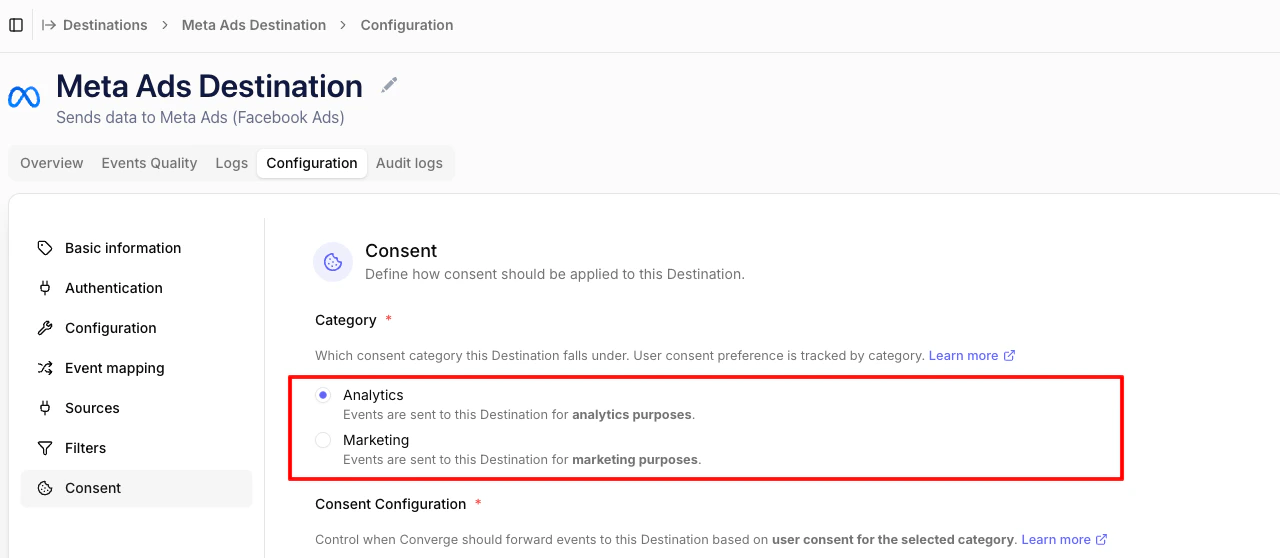
 ### Consent mode
The consent mode controls when Converge forwards events to a destination based on the user's consent preference for the selected category.
* **Always forward (client & server)** (default): Forward all events, ignoring user consent. Includes both client and server-side events.
* **Always forward (server only)**: Forward all server-side events, ignoring user consent. Client events respect the user's consent preference.
* **Implied consent**: Forward events unless the user has explicitly denied consent. If no consent preference was recorded, events are still sent.
* **Require consent**: Forward events only if the user has explicitly consented. If no preference was recorded, events are not sent.
### Consent mode
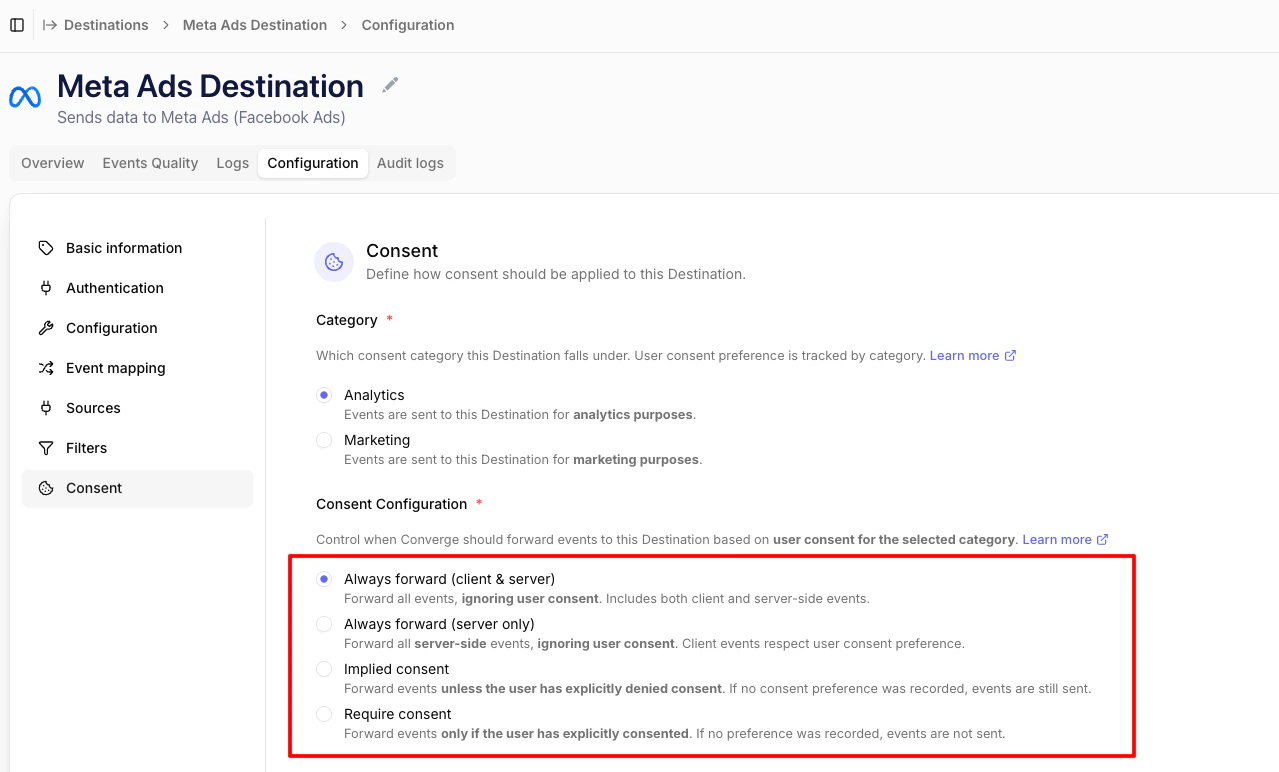
The consent mode controls when Converge forwards events to a destination based on the user's consent preference for the selected category.
* **Always forward (client & server)** (default): Forward all events, ignoring user consent. Includes both client and server-side events.
* **Always forward (server only)**: Forward all server-side events, ignoring user consent. Client events respect the user's consent preference.
* **Implied consent**: Forward events unless the user has explicitly denied consent. If no consent preference was recorded, events are still sent.
* **Require consent**: Forward events only if the user has explicitly consented. If no preference was recorded, events are not sent.
 #### Choosing a mode
A few rules of thumb:
* **Always forward (client & server)** suits destinations that aren't subject to consent (internal analytics, server-to-server data warehouse pipelines, attribution platforms processing first-party data on your behalf).
* **Always forward (server only)** is useful when you want server-side conversions to keep flowing for measurement purposes while still respecting consent on the browser-side pixel.
* **Implied consent** fits an opt-out model: in regions or for visitors where tracking is allowed by default, only stopping when the user explicitly opts out. Use this when your cookie banner is opt-out (e.g. most US states under current state privacy laws) or only shown to specific regions.
* **Require consent** fits an opt-in model: nothing is forwarded until the user explicitly grants consent. Use this for GDPR-style regimes (EU/EEA, UK) where consent must be collected before any marketing tracking takes place.
## How consent is recorded
Converge stores consent in two places:
* **On the profile** (`profile_properties.$consent`), so server-side events for a known visitor inherit the most recent preference.
* **On each event**, snapshotting the consent state at the moment the event was tracked.
Server-side forwarding always uses the profile-level consent. Client-side forwarding uses the event-level consent. This means that for a net-new visitor whose first hit is client-side (e.g. a `$page_load`), Converge needs to know their consent **before that event is tracked** — there's no earlier profile state to fall back on.
For that reason, if you've configured **Implied consent** or **Require consent**, make sure your site is sending a consent signal to Converge before the first event fires. You have two options:
1. Use one of the [automatically integrated CMPs](/sources/consent#automatic-cmp-integrations) (OneTrust, Cookiebot, CookieFirst, CookieYes, Cookie Information, Usercentrics, Avada).
2. Push a default consent state into Converge yourself, before the first `track` call. See the [default-consent snippet](/sources/consent#sending-consent).
Without one of these, Converge defaults to `denied` for any visitor it hasn't seen before, and Implied/Require modes will drop client-side events for net-new visitors until consent is sent.
## Common pitfalls
#### Choosing a mode
A few rules of thumb:
* **Always forward (client & server)** suits destinations that aren't subject to consent (internal analytics, server-to-server data warehouse pipelines, attribution platforms processing first-party data on your behalf).
* **Always forward (server only)** is useful when you want server-side conversions to keep flowing for measurement purposes while still respecting consent on the browser-side pixel.
* **Implied consent** fits an opt-out model: in regions or for visitors where tracking is allowed by default, only stopping when the user explicitly opts out. Use this when your cookie banner is opt-out (e.g. most US states under current state privacy laws) or only shown to specific regions.
* **Require consent** fits an opt-in model: nothing is forwarded until the user explicitly grants consent. Use this for GDPR-style regimes (EU/EEA, UK) where consent must be collected before any marketing tracking takes place.
## How consent is recorded
Converge stores consent in two places:
* **On the profile** (`profile_properties.$consent`), so server-side events for a known visitor inherit the most recent preference.
* **On each event**, snapshotting the consent state at the moment the event was tracked.
Server-side forwarding always uses the profile-level consent. Client-side forwarding uses the event-level consent. This means that for a net-new visitor whose first hit is client-side (e.g. a `$page_load`), Converge needs to know their consent **before that event is tracked** — there's no earlier profile state to fall back on.
For that reason, if you've configured **Implied consent** or **Require consent**, make sure your site is sending a consent signal to Converge before the first event fires. You have two options:
1. Use one of the [automatically integrated CMPs](/sources/consent#automatic-cmp-integrations) (OneTrust, Cookiebot, CookieFirst, CookieYes, Cookie Information, Usercentrics, Avada).
2. Push a default consent state into Converge yourself, before the first `track` call. See the [default-consent snippet](/sources/consent#sending-consent).
Without one of these, Converge defaults to `denied` for any visitor it hasn't seen before, and Implied/Require modes will drop client-side events for net-new visitors until consent is sent.
## Common pitfalls