> ## Documentation Index
> Fetch the complete documentation index at: https://docs.runconverge.com/llms.txt
> Use this file to discover all available pages before exploring further.
# Axon (AppLovin)
> An introduction to the Axon/AppLovin Destination
export const OutboundLink = ({linkText, linkTarget}) => {
return {linkText}
;
};
## Overview
Destination Type:
***
## Installation instructions
This is a client-side destination, so you must track all events client-side, including `Placed Order` and `Started Subscription`, for it to work properly.
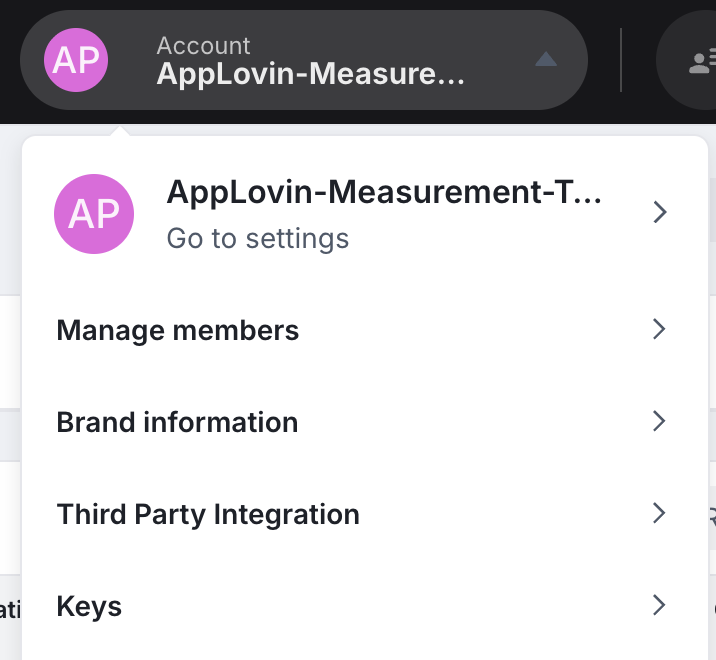
1. Navigate to your and choose **Account > Keys**.
2. Copy your **Axon Event Key**.
3. In the Converge sidebar, click on and then click **Create new Destination**.
4. Select the **Axon (AppLovin)** destination and click **Next**.
5. Give your destination a **name** (e.g. Axon Destination) and click **Next**.
6. Fill in the **Event Key** you copied from **Axon** and click **Next**.
7. Select **Use default mapping** and click **Next**.
You can find the Default mapping for the Axon destination [here](#event-mapping). For more information on setting up Custom mappings, look [here](/destinations/event-mapping).
8. Select the sources you want to forward events from, then click **Next**.
This is a client-side destination, meaning that only client-side sources can be used with this destination. You can still select server-side sources but the events will not be sent to Axon.
9. Review any issues and click **Submit**.
Once you have installed your Converge Destination, you should **pause or remove all existing Axon tracking**. Leaving these on will lead to duplicate tracking.
***
## Modify your Content ID
The Converge Axon Destination will use the **Default** content mode to define the Content ID forwarded by default.
However, you can configure the destination to use explicitly the **Product ID**, the **Variant ID** or **SKU** instead.
1. Navigate to your Axon Destination, click on **Configuration**.
2. Click on the **Configuration**-subtab
3. Open the **Advanced configuration (optional)** section
4. Pick your desired Content ID, and click on **Save**
**List of Content ID Modes**
| Content ID Mode | Behavior |
| --------------- | ----------------------------------------------------------------- |
| Default | Use the `variant_id` if available, otherwise use the `product_id` |
| Product Id | Always use the `product_id` |
| Variant Id | Always use the `variant_id` |
| SKU | Always use the `sku` |
***
## Converge functionality
This integration supports the following Converge destination functionality.
| Converge Feature | Supported |
| ----------------------- | :-------------------: |
| Custom Events | |
| Filters | |
| Server-side Conversions | |
***
## FAQ
*TLDR:* Not for Shopify stores.
Axon recommends implementing *Enhanced User Identification* by setting the `axwrt` cookie through the backend of your store. As **Converge**, by default, is not served under your store's domain, we cannot set this cookie directly in the client, as this would not truly enhance identification. As such, to enable *Enhanced User Identification*, the `axwrt` cookie needs to be implemented directly in your store backend.
Notice that for Shopify stores, as you have no control over the backend, this cookie cannot be set and *Enhanced User Identification* cannot be used.
For other setups where you have control over the backend of your store, please refer to for instructions on how to enable *Enhanced User Identification*.
***
## Event mapping
Converge automatically maps the following events from the [Converge event spec](/sources/converge-spec) to the :
| Converge Event Name | Axon Event Name |
| --------------------------------------------------------------- | ------------------ |
| [\$page\_load](/sources/converge-spec#page-load) | `page_view` |
| [Viewed Product](/sources/converge-spec#viewed-product) | `view_item` |
| [Added To Cart](/sources/converge-spec#added-to-cart) | `add_to_cart` |
| [Removed From Cart](/sources/converge-spec#removed_from_cart) | `remove_from_cart` |
| [Started Checkout](/sources/converge-spec#started-checkout) | `begin_checkout` |
| [Searched](/sources/converge-spec#searched) | `search` |
| [Added Payment Info](/sources/converge-spec#added-payment-info) | `add_payment_info` |
| [Placed Order](/sources/converge-spec#placed-order) | `purchase` |
 3. In the Converge sidebar, click on