> ## Documentation Index
> Fetch the complete documentation index at: https://docs.runconverge.com/llms.txt
> Use this file to discover all available pages before exploring further.
# Criteo
> An introduction to the Criteo Destination
export const OutboundLink = ({linkText, linkTarget}) => {
return {linkText}
;
};
## Overview
Destination Type: and
***
## Installation instructions
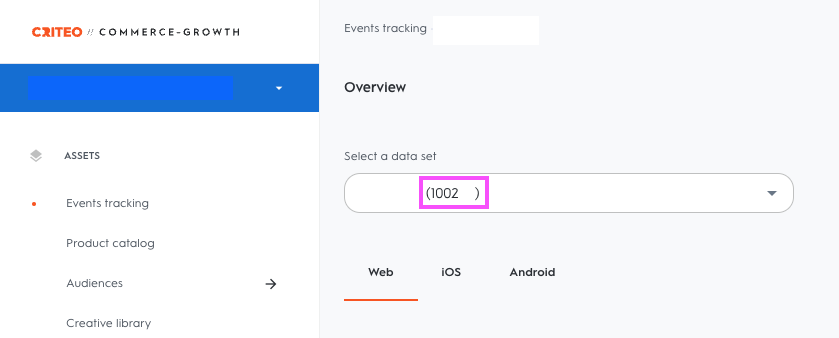
1. Navigate to the
2. Find your **Account Partner ID**, as per the screenshot below
3. In the Converge sidebar, click on and then click **Create new Destination**.
4. Select the **Criteo** destination and click **Next**.
5. Give your destination a **name** (e.g. Criteo Destination) and click **Next**.
6. Fill in the **Account Partner ID** you copied from **Criteo** and click **Next**.
7. Select **Use default mapping** and click **Next**.
You can find the Default mapping for the Criteo destination [here](#event-mapping). For more information on setting up Custom mappings, look [here](/destinations/event-mapping).
8. Select the sources you want to forward events from, then click **Next**.
9. Review any issues and click **Submit**.
Once you have installed your Converge Destination, you should **pause or remove all existing Criteo tracking**. Leaving these on will lead to duplicate tracking.
***
## Modify your Content ID
The Converge Criteo Destination will use the **Product ID** by default.
However, you can configure the destination to use explicitly the **Variant ID** or **SKU** instead.
1. Navigate to your Criteo Destination, click on **Configuration**.
2. Click on the **Configuration**-subtab
3. Open the **Advanced configuration (optional)** section
4. Pick your desired Content ID, and click on **Save**
**List of available Content ID Modes**
| Content ID Mode | Behavior |
| --------------- | --------------------------- |
| Product Id | Always use the `product_id` |
| Variant Id | Always use the `variant_id` |
| SKU | Always use the `sku` |
***
## Converge functionality
This integration supports the following Converge destination functionality.
| Converge Feature | Supported |
| :---------------------- | :-------------------: |
| Custom Events | |
| Filters | |
| Server-side Conversions | |
***
## Event mapping
Converge automatically maps the following events from the [Converge event spec](/sources/converge-spec) to the Criteo spec.
| Converge Event Name | Criteo Event Name |
| --------------------------------------------------------------- | ------------------ |
| [\$page\_load](/sources/converge-spec#page-load) | `viewPage` |
| [Logged In](/sources/converge-spec#logged-in) | `login` |
| [Viewed Product](/sources/converge-spec#viewed-product) | `viewItem` |
| [Added To Cart](/sources/converge-spec#added-to-cart) | `addToCart` |
| [Viewed Cart](/sources/converge-spec#viewed-cart) | `viewBasket` |
| [Started Checkout](/sources/converge-spec#started-checkout) | `beginCheckout` |
| [Viewed Collection](/sources/converge-spec#viewed-collection) | `viewList` |
| [Added Payment Info](/sources/converge-spec#added-payment-info) | `addPaymentInfo` |
| [Placed Order](/sources/converge-spec#placed-order) | `trackTransaction` |
 3. In the Converge sidebar, click on