> ## Documentation Index
> Fetch the complete documentation index at: https://docs.runconverge.com/llms.txt
> Use this file to discover all available pages before exploring further.

# Klaviyo

> An introduction to the Klaviyo Destination

export const OutboundLink = ({linkText, linkTarget}) => {
  return <a target="_blank" href={linkTarget}> {linkText} 
    <div className="inline h-3 w-3 fill-gray-500 dark:fill-gray-100 text-gray-500 dark:text-gray-300 ml-1 mr-1">
      <svg className="inline w-2.5 h-2.5 bg-gray-500 dark:bg-gray-300" style={{
    maskImage: `url('https://mintlify.b-cdn.net/v6.5.1/solid/up-right-from-square.svg')`,
    maskRepeat: "no-repeat",
    maskPosition: "center center"
  }}></svg> 
    </div>
    </a>;
};

export const IconText = ({name, text, iconSource = "mintlify", iconLocation = "before", iconType = "solid"}) => {
  const sourceUrl = iconSource === 'local' ? `url('/images/icons/${name}.svg')` : `url('https://mintlify.b-cdn.net/v6.5.1/${iconType}/${name}.svg')`;
  return <>
            <div className="inline-block pl-2">
                {iconLocation === 'before' && <div className="h-3.5 w-3.5 fill-gray-800 dark:fill-gray-100 text-gray-800 dark:text-gray-100 inline-block align-middle mr-2">
                        <svg className="w-4 h-4 bg-gray-800 dark:bg-gray-100 " style={{
    maskImage: sourceUrl,
    maskRepeat: "no-repeat",
    maskPosition: "center center"
  }} />
                    </div>}
                <span className="inline-block align-middle font-semibold fill-gray-800 dark:fill-gray-100 text-gray-800 dark:text-gray-100 pl-1 pr-2">{text}</span>
                {iconLocation === 'after' && <div className="h-3.5 w-3.5 fill-gray-800 dark:fill-gray-100 text-gray-800 dark:text-gray-100 inline-block align-middle mr-2">
                        <svg className="w-4 h-4 bg-gray-800 dark:bg-gray-100 pr-3" style={{
    maskImage: sourceUrl,
    maskRepeat: "no-repeat",
    maskPosition: "center center"
  }} />
                    </div>}
            </div>
        </>;
};

export const Icon = ({name}) => {
  return <div className="h-4 w-4 fill-gray-800 dark:fill-gray-100 text-gray-800 dark:text-gray-100 inline-block align-middle">
            <svg className="w-4 h-4 bg-gray-800 dark:bg-gray-100" style={{
    maskImage: `url('https://mintlify.b-cdn.net/v6.5.1/solid/${name}.svg')`,
    maskRepeat: "no-repeat",
    maskPosition: "center center"
  }} />
        </div>;
};

## Overview

Destination Type: <IconText text="Client-side" name="browser" iconType="duotone" iconLocation="after" />  and <IconText text="Server-side" name="server" iconType="duotone" iconLocation="after" />

***

## Installation instructions

1. Navigate to your <OutboundLink linkTarget="https://www.klaviyo.com/settings/account/personal" linkText="Klaviyo Admin Dashboard" />.

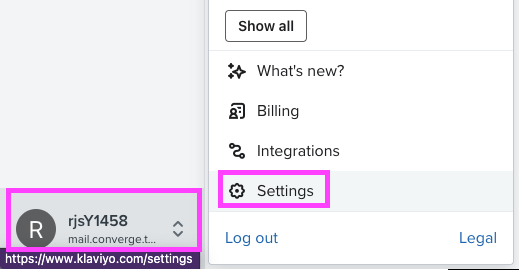
2. In the left-bottom corner of the dashboard, click on your Klaviyo Workspace Name and then on <IconText text="Settings" name="gear" iconLocation="before" iconType="regular" />

<Frame>
  <img src="https://mintcdn.com/converge/L45wyZk0Nu0wVlB6/images/destinations/klaviyo/klaviyo-install-0.png?fit=max&auto=format&n=L45wyZk0Nu0wVlB6&q=85&s=a7801d77c64827680b661312f9c875ab" alt="klaviyo-1" width="519" height="270" data-path="images/destinations/klaviyo/klaviyo-install-0.png" />
</Frame>

3. Under the **Account**-tab, choose **API keys**.

4. Copy your **Public API Key**, you will need it later.

5. Click on **Create Private API Key**

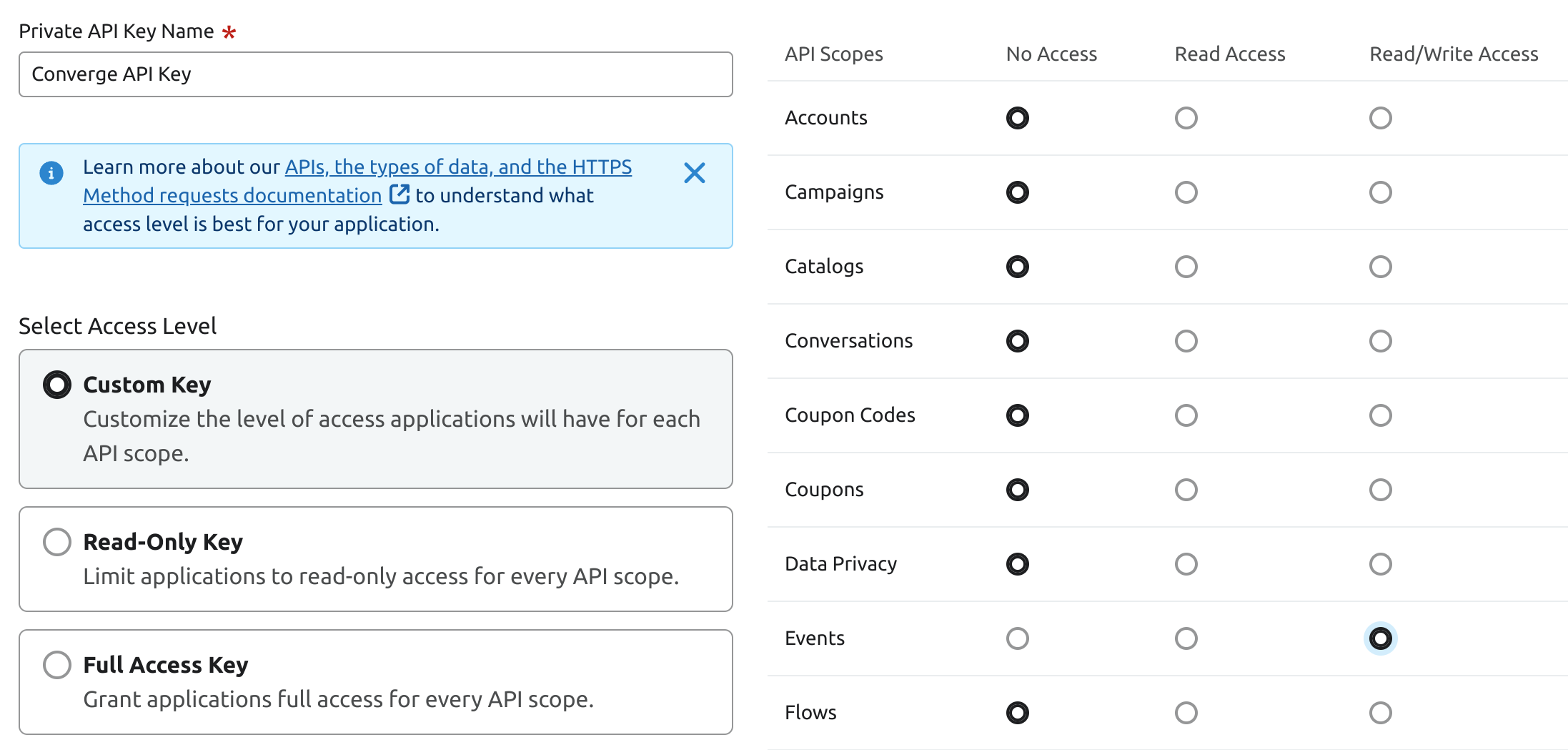
6. Give your key a name and select **Custom Key** in **Select Access Level**

7. Select **Read/Write Access** to the **Events** scope.
<Frame>
  <img src="https://mintcdn.com/converge/L45wyZk0Nu0wVlB6/images/destinations/klaviyo/klaviyo-install-1.png?fit=max&auto=format&n=L45wyZk0Nu0wVlB6&q=85&s=0b7a3eca6cbf7a7631ff2e82f6f549fe" alt="klaviyo-2" width="2194" height="1049" data-path="images/destinations/klaviyo/klaviyo-install-1.png" />
</Frame>

8. Press **Create**

9. Copy the newly created **Private API Key**, you will need it later.

10. In the Converge sidebar, click on <IconText name="arrow-right-from-line" text="Event streams" /> and then click **Create new Destination**.

11. Select the **Klaviyo** destination and click **Next**.

12. Give your destination a **name** (e.g. Klaviyo Destination) and click **Next**.

13. Fill in the **Public API Key** and **Private API Key** you copied from **Klaviyo** and click **Next**.

14. Keep the defaults on the Configuration page and click **Next**.

15. Select **Use default mapping** and click **Next**.

<Note>You can find the Default mapping for the Klaviyo destination [here](#event-mapping). For more information on setting up Custom mappings, look [here](/destinations/event-mapping).</Note>

16. Select the sources you want to forward events from, then click **Next**.

17. Review any issues and click **Submit**.

***

## Converge functionality

This integration supports the following Converge destination functionality.

| Converge Feature                                     |       Supported       |
| ---------------------------------------------------- | :-------------------: |
| Custom Events                                        | <Icon name="check" /> |
| Filters                                              | <Icon name="xmark" /> |
| Server-side Conversions                              | <Icon name="check" /> |
| [Conversion amount](/destinations/conversion-amount) | <Icon name="check" /> |

***

## Using Converge to increase abandoned cart revenue on Klaviyo

You may already be using Klaviyo's abandoned cart flows based on the `Added To Cart` events and `Started Checkout` events tracked by the Klaviyo pixel on the browser.

However, Klaviyo's browser identification is based on a third-party cookie meaning that most customers will not be successfully identified after 7 days (see our section on <OutboundLink linkText="Cookie Behavior" linkTarget="/sources/concepts/aliases#default-cookie-behavior" /> ).

```mermaid actions={false} theme={null}
flowchart LR

  id4("*User* visits website with Klaviyo cookie and **Subscribes to Newsletter**") -. 8 days later (Klaviyo cookie is lost).-> id5("*User* visits website without cookie and **Adds to cart**") ~~~ id6(["**Abandoned Cart Email** ✖"])
  style id6 color:#d40027,stroke:none

```

When Converge is set up with a first-party cookie, it can reliably re-identify customers past that 7-day mark (see: [Setting up a server-side first-party cookie](/sources/concepts/aliases#setting-up-a-server-side-first-party-cookie)).
Customers using our pre-built [Shopify](/sources/website-integrations/shopify) or [Magento](/sources/website-integrations/magento) integrations already have a first-party cookie as part of their Converge setup.

```mermaid actions={false} theme={null}
flowchart LR

  id4("*User* visits website with first-party cookie and **Subscribes to Newsletter**") -. 8 days later (Converge cookie stays).-> id5("*User* visits website with cookie and **Adds to cart**") ~~~ id6(["**Abandoned Cart Email** ✓"])
  style id6 color:#d40027,stroke:none

```

For most customers, we expect an abandoned cart revenue uplift of 20-50%.

## Adding product URL and image URL to Converge events to power Klaviyo flows

A common use case of the Klaviyo Destination is to build Klaviyo Email Flows based on Converge Events.
As such, you might want to include a Product URL or Product Image URL in the Converge Event so you can leverage these in your email flows.

To that end, you will want to extend the Converge event spec for the following events.
Once you add the custom properties to your events, Converge will automatically forward these to the Klaviyo Destination.

### Extending your Converge Event implementation for Klaviyo

Find code examples below that illustrate where **you should add the Product URL and Product Image URL custom event properties**.

<AccordionGroup>
  <Accordion title="Viewed Product" icon="code">
    See the original `Viewed Product` spec [here](/sources/converge-spec.mdx#viewed-product)

    <CodeGroup>
      ```javascript JavaScript theme={null}
      cvg({
        method: "track",
        eventName: "Viewed Product",
        properties: {
          product_id: "123456",
          variant_id: "78910", 
          sku: "MY_SKU",
          name: "My Product",
          variant_name: "Vanilla", 
          price: 42,
          currency: "USD",
          vendor: "My Store",
          url: "https://mystore.com/this-product", // This is new
          image_url: "https://mystore.com/assets/product.png" // This is new
        },
      });
      ```
    </CodeGroup>
  </Accordion>

  <Accordion title="Added To Cart" icon="code">
    See the original `Added To Cart` spec [here](/sources/converge-spec.mdx#added-to-cart)

    <CodeGroup>
      ```javascript JavaScript theme={null}
      cvg({
        method: "track",
        eventName: "Added To Cart",
        properties: {
          product_id: "123456",
          variant_id: "78910",
          sku: "MY_SKU",
          name: "My Product",
          variant_name: "Vanilla",
          price: 42,
          currency: "USD",
          quantity: 1,
          vendor: "My Store",
          url: "https://mystore.com/this-product", // This is new
          image_url: "https://mystore.com/assets/product.png" // This is new
        },
      });

      ```
    </CodeGroup>
  </Accordion>

  <Accordion title="Removed From Cart" icon="code">
    See the original `Removed From Cart` spec [here](/sources/converge-spec.mdx#removed-from-cart)

    <CodeGroup>
      ```javascript JavaScript theme={null}
      cvg({
        method: "track",
        eventName: "Removed From Cart",
        properties: {
          product_id: "123456",
          variant_id: "78910",
          sku: "MY_SKU",
          name: "My Product",
          variant_name: "Vanilla",
          price: 42,
          currency: "USD",
          quantity: 1,
          vendor: "My Store",
          url: "https://mystore.com/this-product", // This is new
          image_url: "https://mystore.com/assets/product.png" // This is new
        },
      });

      ```
    </CodeGroup>
  </Accordion>
</AccordionGroup>

***

## FAQ

<AccordionGroup>
  <Accordion title="I already have the Klaviyo integration for Shopify, should I also set up a Converge destination?">
    If you're using any of Klaviyo's prebuilt integrations, there's still value in setting up the Converge Klaviyo Destination to track the `Viewed Product`, `Viewed Category`, and `Added To Cart` events, or to send [Custom Events](/sources/extending-the-spec/custom-events) to Klaviyo.
  </Accordion>

  <Accordion title="Why do I see events with a Skipped status in the Destination Log?">
    Klaviyo only processes events for identified profiles, visitors with a known email address, phone number, or Klaviyo click ID (`_kx`). When none of these identifiers are present, for example, an anonymous visitor, Converge intentionally skips the event and logs it with a `Skipped` status. This is expected behavior and means the destination is working correctly.
  </Accordion>
</AccordionGroup>

***

## Event mapping

Converge automatically maps the following events from the [Converge event spec](/sources/converge-spec) to the Klaviyo spec.

| Converge Event Name                                           | Klaviyo Event Name  |
| ------------------------------------------------------------- | ------------------- |
| [\$page\_load](/sources/converge-spec#page-load)              | `__activity__`      |
| [Viewed Product](/sources/converge-spec#viewed-product)       | `Viewed Product`    |
| [Viewed Collection](/sources/converge-spec#viewed-collection) | `Viewed Category`   |
| [Added To Cart](/sources/converge-spec#added-to-cart)         | `Added to Cart`     |
| [Removed From Cart](/sources/converge-spec#removed-from-cart) | `Removed from Cart` |
| [Started Checkout](/sources/converge-spec#started-checkout)   | `Started Checkout`  |
| [Placed Order](/sources/converge-spec#placed-order)           | `Placed Order`      |
| [Searched](/sources/converge-spec#searched)                   | `Searched Site`     |

This integration also auto-tracks some additional events that are not part of the Klaviyo Base Spec but are so heavily requested that we automatically forward them.

| Converge Event Name | Klaviyo Event Name |
| ------------------- | ------------------ |
| Ordered Product     | `Ordered Product`  |
