> ## Documentation Index
> Fetch the complete documentation index at: https://docs.runconverge.com/llms.txt
> Use this file to discover all available pages before exploring further.
# TikTok Ads
> An introduction to the TikTok Ads Destination
export const OutboundLink = ({linkText, linkTarget}) => {
return {linkText}
;
};
## Overview
Destination Type: and
* Includes support for the
***
## Installation instructions
1. Navigate to your [TikTok Events Manager](https://ads.tiktok.com/i18n/events_manager/). If the direct link does not open your Events Manager, you can access it from the TikTok Ads Manager dashboard under **Tools** > **Events**.
2. From your Events Manager, **click on "Manage"** under **Web Events**.
3. Click on your pixel, you might have to go through 2FA.
4. From the TikTok Pixel menu, copy your **Pixel ID**, you will need it later. The Pixel ID looks as follows: `CJQBODJC77UB4MRTGFRF`
5. Navigate to the **Settings** subtab and scroll down until you find the **Generate Access Token** button. Click on it to generate your token and keep it around for the next steps.
6. In the Converge sidebar, click on and then click **Create new Destination**.
7. Select the **TikTok** destination and click **Next**.
8. Give your destination a **name** (e.g. TikTok Destination) and click **Next**.
9. Fill in the **Pixel ID** and **Access Token** you copied from **TikTok** and click **Next**.
10. Fill in your homepage domain name in the **Your Domain name** field, including `https://`. Click **Next**.
11. Select **Use default mapping** and click **Next**.
You can find the Default mapping for the TikTok destination [here](#event-mapping). For more information on setting up Custom mappings, look [here](/destinations/event-mapping).
12. Select the sources you want to forward events from, then click **Next**.
13. Review any issues and click **Submit**.
Set this destination to **Deactivated** while you remove your existing TikTok tracking setup. Running both in parallel leads to duplicate conversion data. Follow the **Turn off your old TikTok tracking** instructions below, then set the destination to **Active** when you're ready.
***
## Turn off your old TikTok tracking
### Turning off the Shopify TikTok Sales Channel data sharing
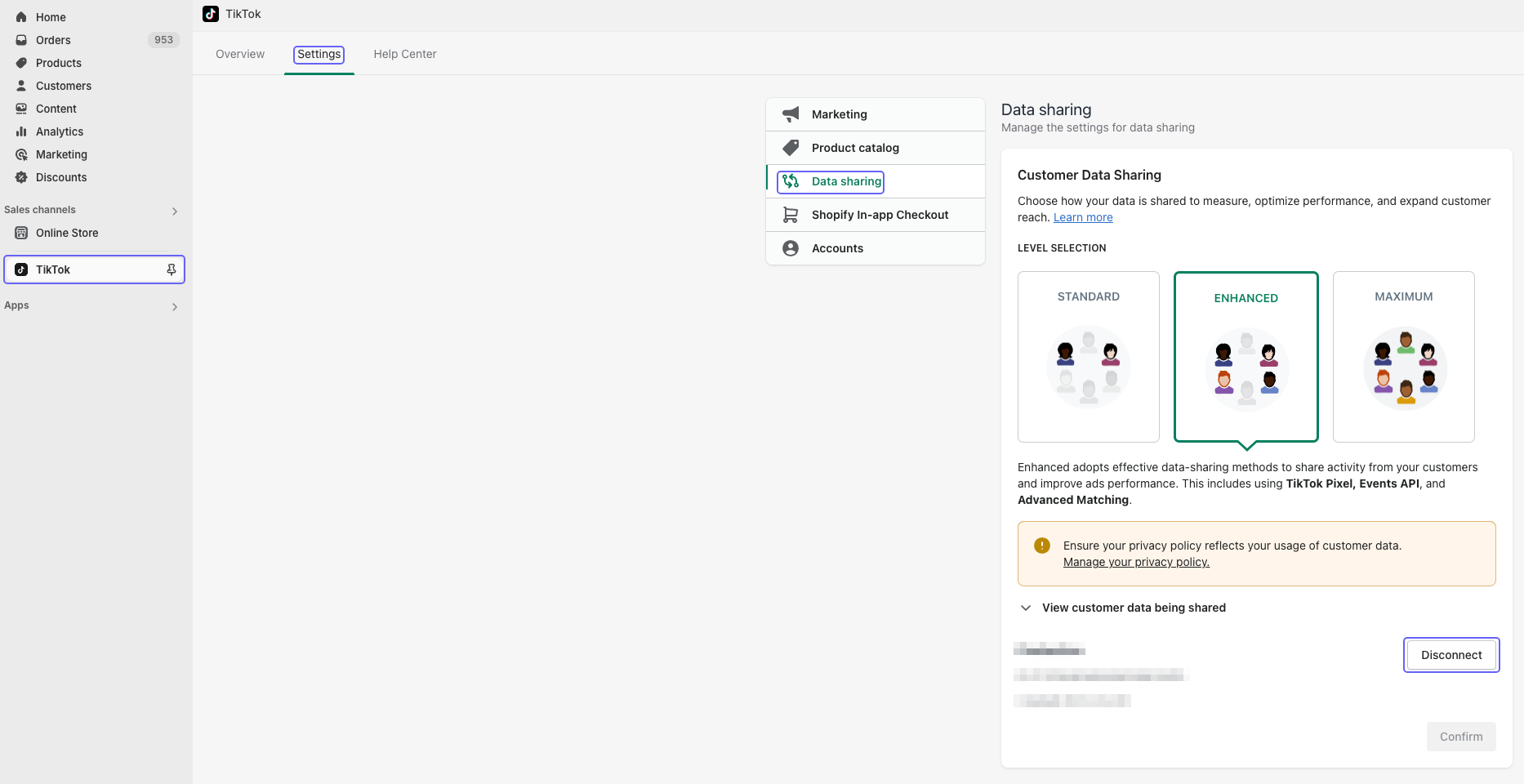
1. Navigate to your .
2. Click on **Sales channels** and choose **TikTok** from the *Installed sales channels* menu.
3. Click on **Settings**, then **Data sharing**, and finally click on **Disconnect**.
4. After reading and confirming the impact of disconnecting the pixel, click on **Disconnect**.
This will prevent you from creating TikTok campaigns from the Sales Channel, but **it won't impact any campaigns or ads in your TikTok Ads Manager**. We strongly recommend running ads from the Ads Manager instead of the TikTok Sales Channel.
***
## Modify your Content ID
The Converge TikTok Destination will use the **Default** content mode to define the Content ID forwarded by default.
However, you can configure the destination to use explicitly the **Product ID**, the **Variant ID** or **SKU** instead.
1. Navigate to your TikTok Destination, click on **Configuration**.
2. Click on the **Configuration**-subtab
3. Open the **Advanced configuration (optional)** section
4. Pick your desired Content ID, and click on **Save**
**List of Content ID Modes**
| Content ID Mode | Behavior |
| --------------- | ----------------------------------------------------------------- |
| Default | Use the `variant_id` if available, otherwise use the `product_id` |
| Product Id | Always use the `product_id` |
| Variant Id | Always use the `variant_id` |
| SKU | Always use the `sku` |
***
## Converge functionality
This integration supports the following Converge destination functionality.
| Converge Feature | Supported |
| ---------------------------------------------------- | :-------------------: |
| Custom Events | |
| Filters | |
| Server-side Conversions | |
| [Conversion amount](/destinations/conversion-amount) | |
## Event mapping
Converge automatically maps the following events from the [Converge event spec](/sources/converge-spec) to the TikTok Ads spec.
| Converge Event Name | TikTok Ads Event Name |
| ------------------------------------------------------------------------------------------------- | --------------------------------------- |
| [\$page\_load](/sources/converge-spec#page-load) | `PageView` |
| [Viewed Product](/sources/converge-spec#viewed-product) | `ViewContent` |
| [Viewed Collection](/sources/converge-spec#viewed-collection) | `ViewContent` |
| [Added To Cart](/sources/converge-spec#added-to-cart) | `AddToCart` |
| [Started Checkout](/sources/converge-spec#started-checkout) | `InitiateCheckout` |
| [Added Payment Info](/sources/converge-spec#added-payment-info) | `AddPaymentInfo` |
| [Placed Order](/sources/converge-spec#placed-order) | `Purchase` |
| [Started Subscription](/sources/converge-spec#started-subscription) | `Subscribe` |
| [Placed Recurring Subscription Order](/sources/converge-spec#placed-recurring-subscription-order) | `RecurringSubscriptionPaymentSucceeded` |
| [Cancelled Subscription](/sources/converge-spec#cancelled-subscription) | `CancelSubscription` |
| [Activated Subscription](/sources/converge-spec#activated-subscription) | `Subscribe` |
| [Searched](/sources/converge-spec#searched) | `Search` |
| [Subscribed To Newsletter](/sources/converge-spec#subscribed-to-newsletter) | `CompleteRegistration` |
This integration also auto-tracks some additional events that are not part of the TikTok Base Spec but are so heavily requested that we automatically forward them.
| Converge Event Name | TikTok Event Name |
| ------------------------------------------------------------------------- | --------------------- |
| [Placed Order](/sources/converge-spec#placed-order) (New Customers Only) | `NewCustomerPurchase` |
| | |
 4. After reading and confirming the impact of disconnecting the pixel, click on **Disconnect**.
