> ## Documentation Index
> Fetch the complete documentation index at: https://docs.runconverge.com/llms.txt
> Use this file to discover all available pages before exploring further.
# Vibe
> An introduction to the Vibe Destination
export const OutboundLink = ({linkText, linkTarget}) => {
return {linkText}
;
};
## Overview
Destination Type:
* Converge automatically loads the Vibe Pixel (`vbpx.js`) and forwards supported events.
* For Vibe's official pixel reference, see .
***
## Installation instructions
1. In your Vibe account, go to **Settings** → **Tracking** → **Web Pixel**.
2. Choose your **Advertiser** and click **Setup**.
3. Copy the **Advertiser ID** from the pixel setup page.
If you are using the manual implementation in Vibe, this is the same ID that appears inside the pixel snippet you would normally paste between your site's \ tags.
4. In the Converge sidebar, click → **Create new Destination**.
5. Select **Vibe** and click **Next**.
6. Give your destination a **name** (e.g. Vibe Destination) and click **Next**.
7. Paste your **Advertiser ID** and click **Next**.
8. Keep **Default mapping** or configure **Custom mapping**, then click **Next**.
9. Select the sources you want to forward events from, then click **Next**.
10. Review any issues and click **Submit**.
If you already installed the Vibe Pixel directly in your site or via GTM, pause or remove that setup to avoid duplicate tracking. Converge will load vbpx.js on your pages.
***
## Converge functionality
This integration supports the following Converge destination functionality.
| Converge Feature | Supported |
| ------------------ | :-------------------: |
| Custom Events | |
| Filters | |
| Server-side Events | |
***
## Verify your implementation
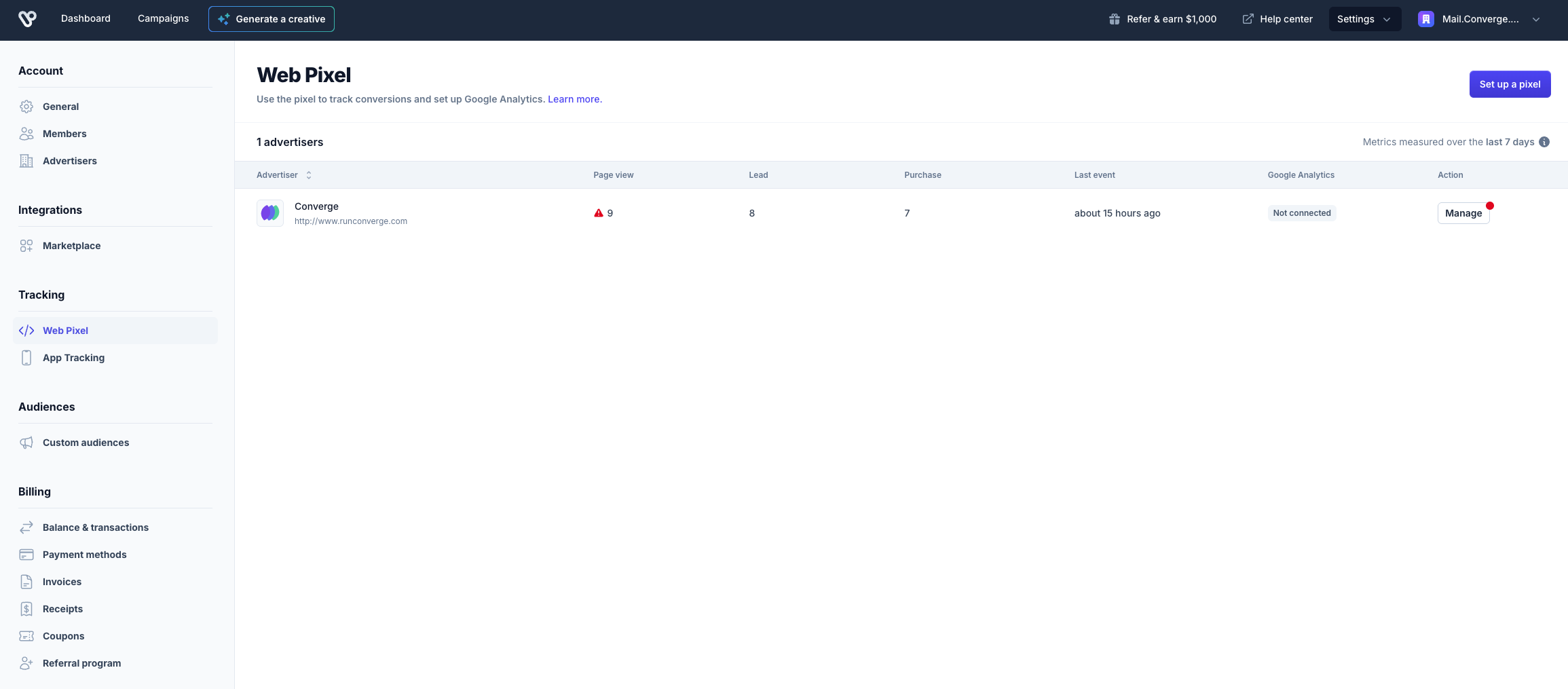
After activating this connection, verify that events are being sent to Vibe by checking your Vibe Advertisers dashboard:
1. In your Vibe account, go to **Settings** → **Tracking** → **Web Pixel** (same location as when finding your Advertiser ID).
2. On the Web Pixel page, you'll see a table showing your advertisers and their event metrics.
3. Check the event counts for **Page view**, **Lead**, and **Purchase** to confirm events are being received. Also, verify the **Last event** date shows recent activity.
It may take some time for Vibe to display this data. Vibe's dashboard is not always real-time, so there may be a delay before events appear.
Alternatively, you can verify your implementation using your browser's Developer Tools:
1. Open the page(s) where the pixel should fire.
2. Open **Developer Tools** → **Network** tab.
3. Filter by "Vibe".
4. You should see two network rows:
* `vbpx.js`
* `s?aid...`
5. Click the `s?aid...` row → **Payload**.
* The `aid` parameter should show your Advertiser ID.
* The `a` parameter should show the event name (e.g. `page_view`, `lead`, or `purchase`).
For more details, refer to the Vibe documentation: .
***
## Event mapping
Converge automatically maps the following events from the [Converge event spec](/sources/converge-spec) to the Vibe pixel.
| Converge Event Name | Vibe Event Name |
| --------------------------------------------------- | --------------- |
| [\$page\_load](/sources/converge-spec#page-load) | `page_view` |
| [Lead](/sources/extending-the-spec/custom-events) | `lead` |
| [Placed Order](/sources/converge-spec#placed-order) | `purchase` |
### Purchase parameters sent
* **price\_usd**: Converge forwards the total purchase value converted to USD when available.
* **purchase\_id**: Forwarded when present, enabling per-order reconciliation in Vibe.
Vibe allows you to attribute purchases with dynamic values. Converge handles currency conversion by sending price\_usd to Vibe when the original event is in a non-USD currency.
***
## Additional events and custom mapping
Vibe does not accept arbitrary custom event names. The Vibe Pixel recognizes only three event types: `page_view`, `lead`, and `purchase`.