> ## Documentation Index
> Fetch the complete documentation index at: https://docs.runconverge.com/llms.txt
> Use this file to discover all available pages before exploring further.
# Debugging stitching issues
> How to debug stitching issues in Converge
export const OutboundLink = ({linkText, linkTarget}) => {
return {linkText}
;
};
## Introduction
Stitching server-side tracked events to web sessions is a vital part of a healthy tracking setup. It enables Converge to optimize tracking for your destinations. That’s why it’s important to monitor your stitching rate and check if it falls below expected levels. A stitching rate of **95%+** is considered healthy.
You can review your stitching rate in the Data Quality report. It shows the percentage of server-side Placed Order events that Converge matched to a web session.
## How to review your stitching rate
If your stitching rate drops below 95%, the Data Quality report will show a warning. Start investigating by clicking on the event and navigating to the Stitching tab in the event details pane on the right.
In this overview, you'll see:
| Field | Description |
| :----------------------- | :----------------------------------------------- |
| **Sales channel type** | Which sales channels were applied to your events |
| **Stitching rate graph** | Stitching rate over time |
| **Total server events** | Total received server-side events |
| **Unstitched events** | Number of unstitched server-side events |
| **Stitched rate** | Percentage of stitched server-side events |
| **Unstitched Events** | List of individual unstitched events |
| **Delayed Events** | List of events stitched after being sent |
To verify if there’s a real issue, select a time range covering a few weeks. If your stitching rate is above 95% on most days, it’s best to keep monitoring before digging deeper.
## Possible causes
There are many reasons why a session wasn’t stitched, but most issues fall into three categories.
### Web session wasn’t tracked
For stitching to happen, the web session must be tracked first. Common reasons it might not be:
1. **Ad blockers** could prevent Converge from tracking the session.
2. **Consent settings** could block tracking based on user preferences.
3. **Bad implementations** could prevent Converge from loading and tracking the session.
Although Converge works to avoid being blocked by ad blockers, it’s almost impossible to fully prevent. This is why we don’t aim for a 100% stitching rate.
If your site’s consent settings aren’t the cause, check your Converge implementation and make sure all pages are tracked correctly.
### Missing aliases
Converge uses aliases to stitch server-side events to web sessions. These are unique identifiers, like a **Cart Token**, **Email**, or **User ID**.
If a server-side event doesn’t contain an alias that matches a client-side tracked event, it won’t be stitched. You can check aliases for individual unstitched events by clicking the **\{ }** icon and going to the **Aliases** tab.
It’s best practice to add multiple aliases to your events. This gives Converge more options to stitch events and improves your stitching rate. Learn more about which aliases to pass [here](/sources/concepts/aliases#what-aliases-should-i-pass%3F).
### Delayed aliases
Sometimes a server-side event can’t be stitched immediately but gets stitched later.
For example, a server-side event might include only an email address. If the user didn’t enter their email during the web session (because they were already logged in), stitching can’t happen right away.
If the user later logs in again or subscribes to a newsletter and submits their email, Converge can stitch the past server-side event.
In this case:
* **Converge reports will update** based on the stitched event.
* But **events already sent to your destinations won’t retroactively include client-side identifiers**, which can impact conversion tracking.
 ## How to review your stitching rate
If your stitching rate drops below 95%, the Data Quality report will show a warning. Start investigating by clicking on the event and navigating to the Stitching tab in the event details pane on the right.
## How to review your stitching rate
If your stitching rate drops below 95%, the Data Quality report will show a warning. Start investigating by clicking on the event and navigating to the Stitching tab in the event details pane on the right.
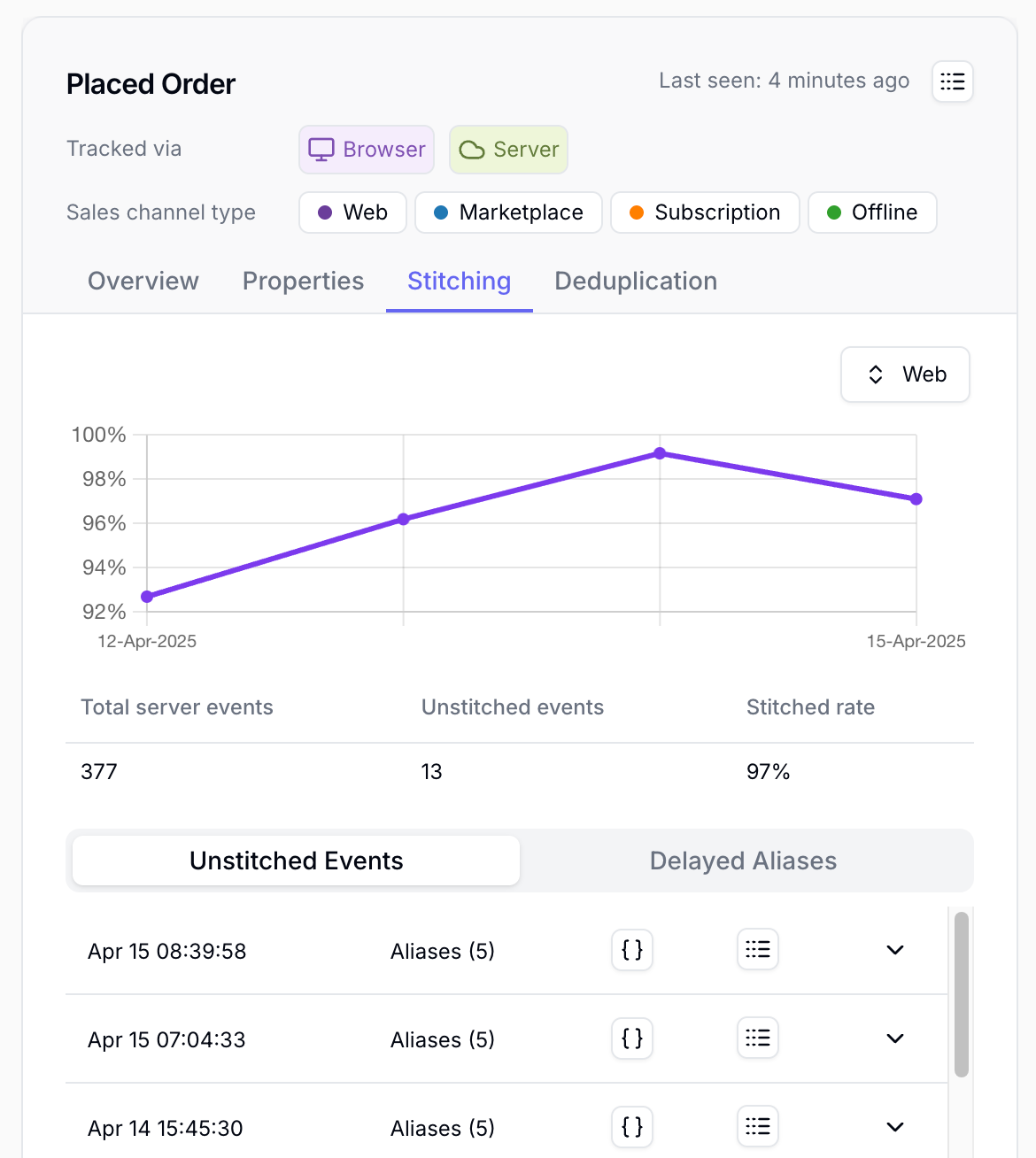 In this overview, you'll see:
| Field | Description |
| :----------------------- | :----------------------------------------------- |
| **Sales channel type** | Which sales channels were applied to your events |
| **Stitching rate graph** | Stitching rate over time |
| **Total server events** | Total received server-side events |
| **Unstitched events** | Number of unstitched server-side events |
| **Stitched rate** | Percentage of stitched server-side events |
| **Unstitched Events** | List of individual unstitched events |
| **Delayed Events** | List of events stitched after being sent |
To verify if there’s a real issue, select a time range covering a few weeks. If your stitching rate is above 95% on most days, it’s best to keep monitoring before digging deeper.
## Possible causes
There are many reasons why a session wasn’t stitched, but most issues fall into three categories.
### Web session wasn’t tracked
For stitching to happen, the web session must be tracked first. Common reasons it might not be:
1. **Ad blockers** could prevent Converge from tracking the session.
2. **Consent settings** could block tracking based on user preferences.
3. **Bad implementations** could prevent Converge from loading and tracking the session.
In this overview, you'll see:
| Field | Description |
| :----------------------- | :----------------------------------------------- |
| **Sales channel type** | Which sales channels were applied to your events |
| **Stitching rate graph** | Stitching rate over time |
| **Total server events** | Total received server-side events |
| **Unstitched events** | Number of unstitched server-side events |
| **Stitched rate** | Percentage of stitched server-side events |
| **Unstitched Events** | List of individual unstitched events |
| **Delayed Events** | List of events stitched after being sent |
To verify if there’s a real issue, select a time range covering a few weeks. If your stitching rate is above 95% on most days, it’s best to keep monitoring before digging deeper.
## Possible causes
There are many reasons why a session wasn’t stitched, but most issues fall into three categories.
### Web session wasn’t tracked
For stitching to happen, the web session must be tracked first. Common reasons it might not be:
1. **Ad blockers** could prevent Converge from tracking the session.
2. **Consent settings** could block tracking based on user preferences.
3. **Bad implementations** could prevent Converge from loading and tracking the session.