> ## Documentation Index
> Fetch the complete documentation index at: https://docs.runconverge.com/llms.txt
> Use this file to discover all available pages before exploring further.

# Dashboards

export const OutboundLink = ({linkText, linkTarget}) => {
  return <a target="_blank" href={linkTarget}> {linkText} 
    <div className="inline h-3 w-3 fill-gray-500 dark:fill-gray-100 text-gray-500 dark:text-gray-300 ml-1 mr-1">
      <svg className="inline w-2.5 h-2.5 bg-gray-500 dark:bg-gray-300" style={{
    maskImage: `url('https://mintlify.b-cdn.net/v6.5.1/solid/up-right-from-square.svg')`,
    maskRepeat: "no-repeat",
    maskPosition: "center center"
  }}></svg> 
    </div>
    </a>;
};

export const Icon = ({name}) => {
  return <div className="h-4 w-4 fill-gray-800 dark:fill-gray-100 text-gray-800 dark:text-gray-100 inline-block align-middle">
            <svg className="w-4 h-4 bg-gray-800 dark:bg-gray-100" style={{
    maskImage: `url('https://mintlify.b-cdn.net/v6.5.1/solid/${name}.svg')`,
    maskRepeat: "no-repeat",
    maskPosition: "center center"
  }} />
        </div>;
};

export const IconText = ({name, text, iconSource = "mintlify", iconLocation = "before", iconType = "solid"}) => {
  const sourceUrl = iconSource === 'local' ? `url('/images/icons/${name}.svg')` : `url('https://mintlify.b-cdn.net/v6.5.1/${iconType}/${name}.svg')`;
  return <>
            <div className="inline-block pl-2">
                {iconLocation === 'before' && <div className="h-3.5 w-3.5 fill-gray-800 dark:fill-gray-100 text-gray-800 dark:text-gray-100 inline-block align-middle mr-2">
                        <svg className="w-4 h-4 bg-gray-800 dark:bg-gray-100 " style={{
    maskImage: sourceUrl,
    maskRepeat: "no-repeat",
    maskPosition: "center center"
  }} />
                    </div>}
                <span className="inline-block align-middle font-semibold fill-gray-800 dark:fill-gray-100 text-gray-800 dark:text-gray-100 pl-1 pr-2">{text}</span>
                {iconLocation === 'after' && <div className="h-3.5 w-3.5 fill-gray-800 dark:fill-gray-100 text-gray-800 dark:text-gray-100 inline-block align-middle mr-2">
                        <svg className="w-4 h-4 bg-gray-800 dark:bg-gray-100 pr-3" style={{
    maskImage: sourceUrl,
    maskRepeat: "no-repeat",
    maskPosition: "center center"
  }} />
                    </div>}
            </div>
        </>;
};

## What is a dashboard

A dashboard is a collection of insights that can easily be shared.
Dashboards allow you to group and bring together related insights in one place.

## How to create your first dashboard

1. From the sidebar click on **Dashboards** and click on **Create new Dashboard**.

2. This will open the dashboard builder view, click on the <Icon name="pencil" />-icon next to "Unnamed dashboard" and give the dashboard a name, e.g. `Marketing KPIs`.
   <Frame>
     <img src="https://mintcdn.com/converge/zWlDFBz7l1F_0PFn/images/insights-dashboards/dashboard-rename.png?fit=max&auto=format&n=zWlDFBz7l1F_0PFn&q=85&s=21f844aea399c3a7135eb563ddf10a99" alt="Dashboard rename" width="518" height="99" data-path="images/insights-dashboards/dashboard-rename.png" />
   </Frame>

3. Click on the <Icon name="check" />-icon to save the new name.

4. Click on <IconText text="Add insight" name="plus" />

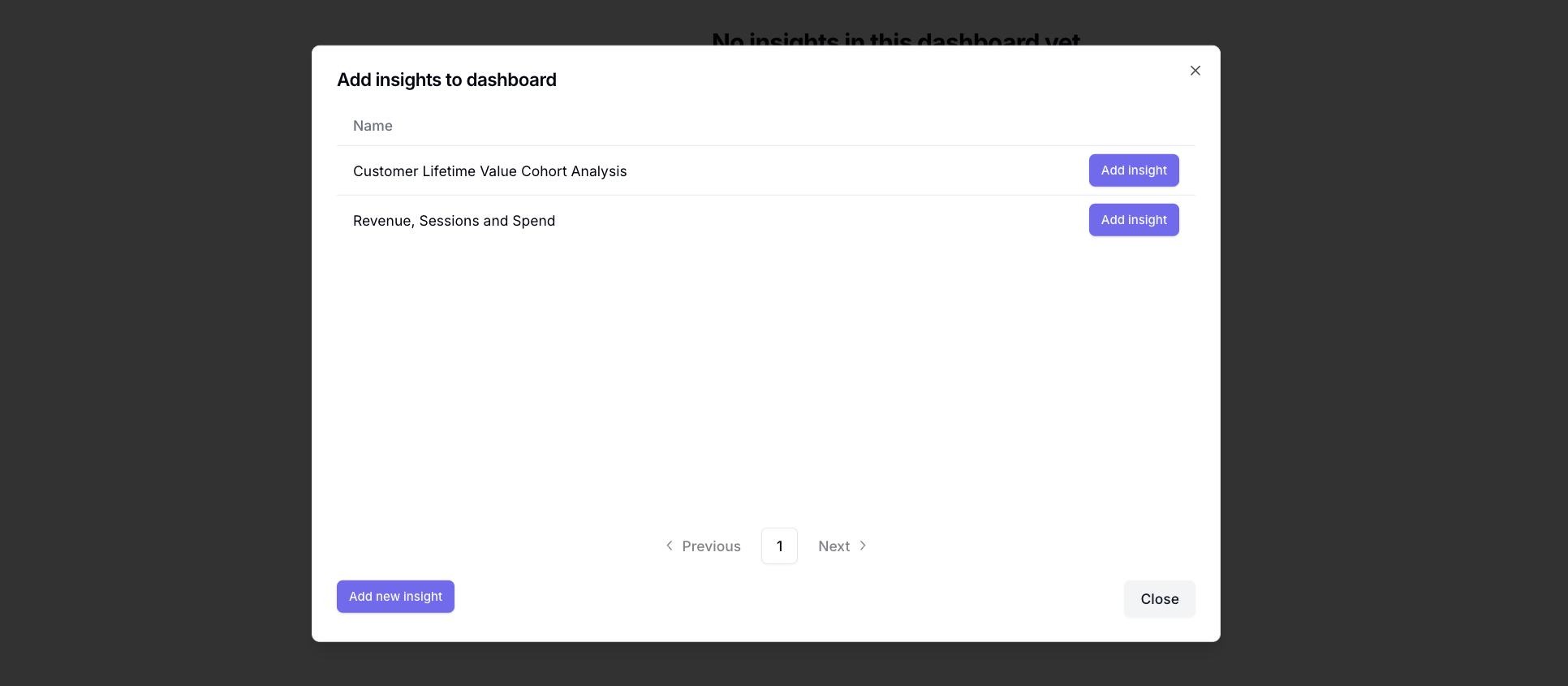
5. Click on the **Add insight** button for the insights you'd like to add
   <Frame>
     <img src="https://mintcdn.com/converge/zWlDFBz7l1F_0PFn/images/insights-dashboards/dashboard-insights-picker.png?fit=max&auto=format&n=zWlDFBz7l1F_0PFn&q=85&s=6aa873a0983ac4d294337f8fd73bdbbc" alt="Add insight" width="1932" height="845" data-path="images/insights-dashboards/dashboard-insights-picker.png" />
   </Frame>

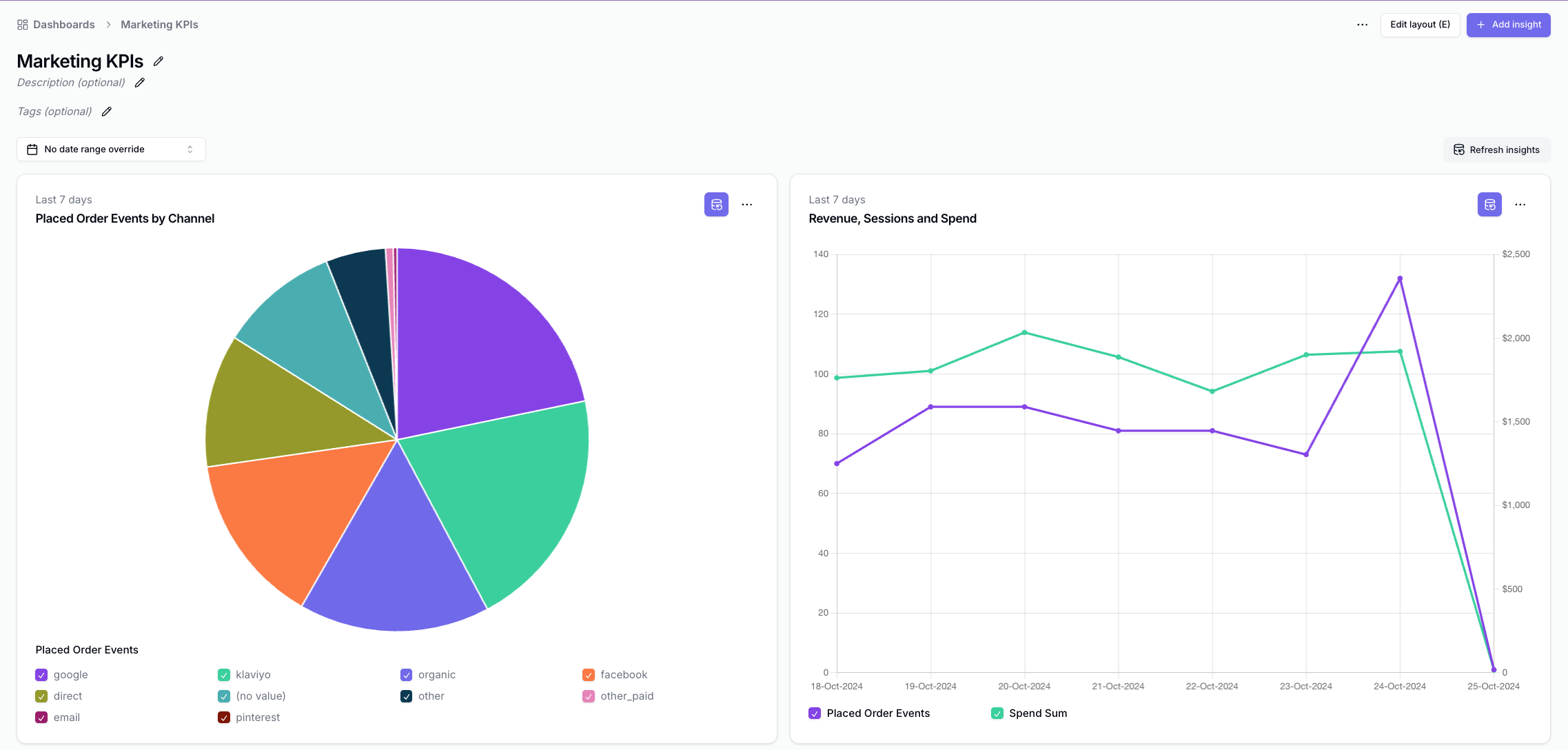
6. Click on **Edit layout (E)** in the top right corner, and move and resize the insights until you're happy with the dashboard.

7. Click on **Done editing** once you're happy.

8. You've created your first dashboard.

   <Frame>
     <img src="https://mintcdn.com/converge/zWlDFBz7l1F_0PFn/images/insights-dashboards/dashboard-finished-example.png?fit=max&auto=format&n=zWlDFBz7l1F_0PFn&q=85&s=59556500cc5cd5395c04392320ec4f22" alt="Dashboard created" width="2275" height="1088" data-path="images/insights-dashboards/dashboard-finished-example.png" />
   </Frame>