> ## Documentation Index
> Fetch the complete documentation index at: https://docs.runconverge.com/llms.txt
> Use this file to discover all available pages before exploring further.
# Ask Claude in Slack
> Query your Converge analytics data from Slack by @mentioning Claude.
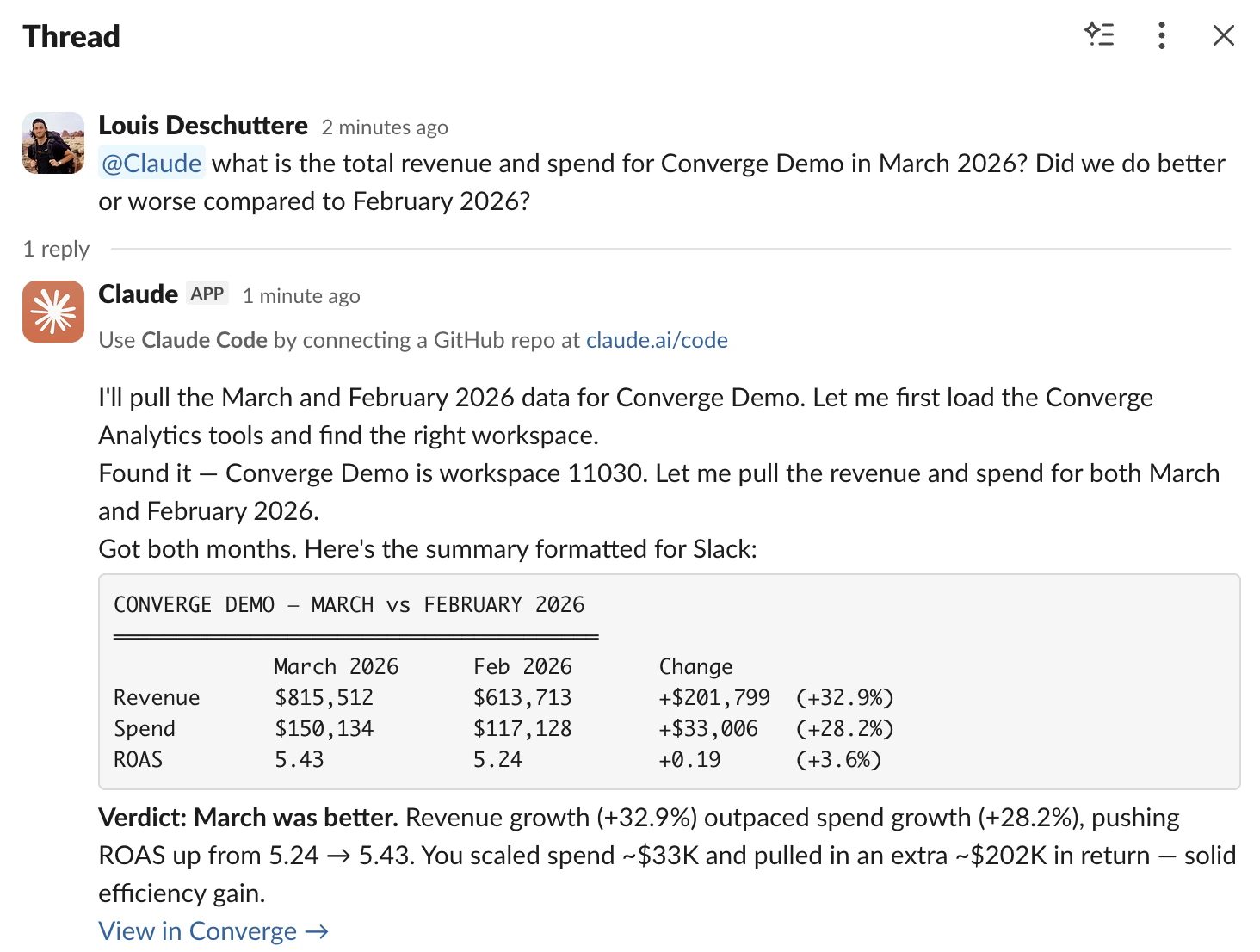
Ask analytics questions right from Slack. @mention Claude, and it calls the Converge MCP server behind the scenes to fetch your data and reply in-thread. No context switching, no dashboards to open. See the [overview](/mcp/overview) for the full list of available tools and authentication details.
 ## Prerequisites
Before setting up Claude in Slack, connect the Converge MCP server to your Claude account first. Follow the [setup guide](/mcp/setup) to get started.
## Set up Claude in Slack
A Slack workspace admin installs the Claude app from the [Slack Marketplace](https://slack.com/marketplace/A08SF47R6P4-claude).
Open the Claude app in Slack and click **Connect Account**. Authorize with the
same Claude account where you connected the Converge MCP server.
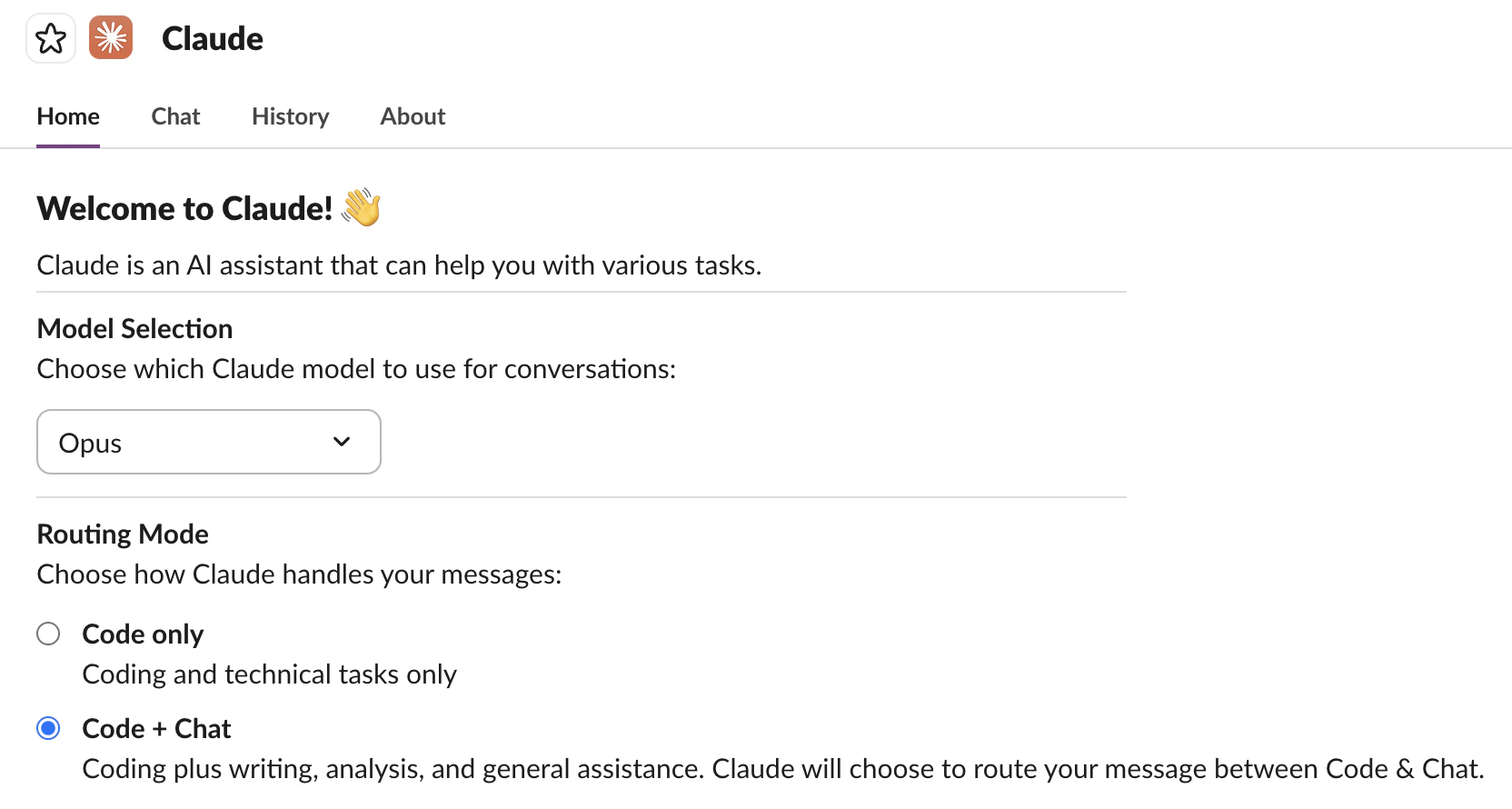
In the Claude app home in Slack, find **Routing Mode** and select **Code + Chat**. This lets Claude route analytics questions through Chat, where MCP connectors live.
The routing options are:
* **Code**: Routes all messages to Claude Code (no MCP access).
* **Code + Chat**: Claude decides which mode fits the message. Pick this one so analytics questions go through Chat (MCP connectors available) while code questions still work.
## Prerequisites
Before setting up Claude in Slack, connect the Converge MCP server to your Claude account first. Follow the [setup guide](/mcp/setup) to get started.
## Set up Claude in Slack
A Slack workspace admin installs the Claude app from the [Slack Marketplace](https://slack.com/marketplace/A08SF47R6P4-claude).
Open the Claude app in Slack and click **Connect Account**. Authorize with the
same Claude account where you connected the Converge MCP server.
In the Claude app home in Slack, find **Routing Mode** and select **Code + Chat**. This lets Claude route analytics questions through Chat, where MCP connectors live.
The routing options are:
* **Code**: Routes all messages to Claude Code (no MCP access).
* **Code + Chat**: Claude decides which mode fits the message. Pick this one so analytics questions go through Chat (MCP connectors available) while code questions still work.
 In the Slack channel where you want to use Claude, type `/invite @Claude`.
@mention Claude with an analytics question to confirm everything works. For example:
> @Claude what is revenue for Acme Corp for the last 7 days?
Claude should call the Converge MCP server and reply with your data in the thread. Note that Claude keeps context within a Slack thread. Reply in the same thread and @mention Claude to ask follow-up questions without repeating yourself.
In the Slack channel where you want to use Claude, type `/invite @Claude`.
@mention Claude with an analytics question to confirm everything works. For example:
> @Claude what is revenue for Acme Corp for the last 7 days?
Claude should call the Converge MCP server and reply with your data in the thread. Note that Claude keeps context within a Slack thread. Reply in the same thread and @mention Claude to ask follow-up questions without repeating yourself.