> ## Documentation Index
> Fetch the complete documentation index at: https://docs.runconverge.com/llms.txt
> Use this file to discover all available pages before exploring further.
# Slack
> Connect Slack once for your whole workspace so Converge can deliver reports to your channels.
Converge posts as the **converge** bot, never as you. Today, routines are the only feature that posts to Slack.
## How it works
The Slack connection is shared across your workspace. A workspace admin connects it once under [**Settings → Integrations**](https://app.runconverge.com/-/settings/workspace-integrations). After that, Converge can pick a channel and deliver through the same connection.
## Connect Slack
Only workspace admins can connect, reconnect, or disconnect Slack. If you're
not an admin, ask one to set it up.
Go to [**Settings →
Integrations**](https://app.runconverge.com/-/settings/workspace-integrations),
click **Add connection** and select **Slack**.
Click **Add to Slack** and authorize the app in your Slack workspace. Slack
returns you to Converge once it's connected.
Slack bot tokens don't expire, so you connect once and the connection keeps working until it's revoked or disconnected.
## Add the bot to a channel
Connecting Slack installs the converge app in your workspace, but it can only post in channels it's a member of. After you connect, add the bot to each channel you want reports in.
1. Open the channel in Slack.
2. Type `@converge` and send the message.
3. Slack asks whether to add the bot. Depending on your Slack app, it shows a popup (like the one below) or prompts you right in the channel. Either way, choose **Add to Channel**.
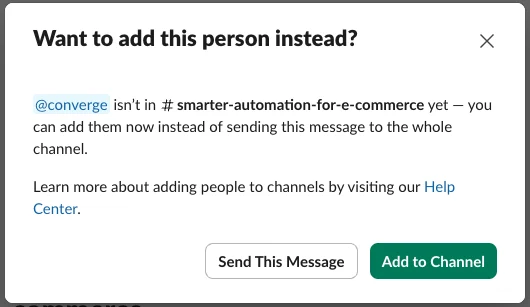 Once the bot's a member, Converge can post there. Private channels won't appear until you've added the bot to it.
## What Converge can and can't do
When you connect, Converge asks Slack for permission to:
* **Post messages as the converge bot.** Deliver reports to the channels you pick. Messages come from Converge, not from you.
* **See your list of channels.** So Converge can choose where to post.
* **Read basic profile info.** To @mention the right teammates in a report.
Converge can't read your messages, files, or conversation history, and it only posts when a routine runs.
## Related
* [Routines](/mcp/routines): schedule reports and deliver them to Slack or email.
Once the bot's a member, Converge can post there. Private channels won't appear until you've added the bot to it.
## What Converge can and can't do
When you connect, Converge asks Slack for permission to:
* **Post messages as the converge bot.** Deliver reports to the channels you pick. Messages come from Converge, not from you.
* **See your list of channels.** So Converge can choose where to post.
* **Read basic profile info.** To @mention the right teammates in a report.
Converge can't read your messages, files, or conversation history, and it only posts when a routine runs.
## Related
* [Routines](/mcp/routines): schedule reports and deliver them to Slack or email.