> ## Documentation Index
> Fetch the complete documentation index at: https://docs.runconverge.com/llms.txt
> Use this file to discover all available pages before exploring further.

# Firmhouse

> Connect your Firmhouse subscription events to Converge

export const OutboundLink = ({linkText, linkTarget}) => {
  return <a target="_blank" href={linkTarget}> {linkText} 
    <div className="inline h-3 w-3 fill-gray-500 dark:fill-gray-100 text-gray-500 dark:text-gray-300 ml-1 mr-1">
      <svg className="inline w-2.5 h-2.5 bg-gray-500 dark:bg-gray-300" style={{
    maskImage: `url('https://mintlify.b-cdn.net/v6.5.1/solid/up-right-from-square.svg')`,
    maskRepeat: "no-repeat",
    maskPosition: "center center"
  }}></svg> 
    </div>
    </a>;
};

## Installation instructions

Firmhouse is primarily used as a subscription backend and checkout that is run in parallel with an ecommerce platform such as Shopify, but some merchants choose to run Firmhouse standalone without a shopping backend.
Your Converge configuration will depend on your specific Firmhouse setup.

<Steps>
  <Step title="Navigate to the Firmhouse Admin Dashboard">
    1. Navigate to your <OutboundLink linkText="Firmhouse Dashboard" linkTarget="https://portal.firmhouse.com/sign_in" />
  </Step>

  <Step title="Create your API token">
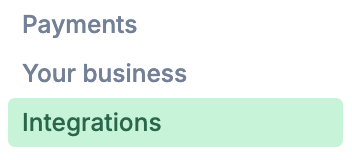
    2. Click on **Integrations** in the side panel
           <Frame>
             <img src="https://mintcdn.com/converge/ecGnucKsPgTlQzkL/images/sources/firmhouse/integrations-section.png?fit=max&auto=format&n=ecGnucKsPgTlQzkL&q=85&s=5dfb97ae0c727b5a367d0500d0502696" alt="integrations" width="352" height="160" data-path="images/sources/firmhouse/integrations-section.png" />
           </Frame>
    3. Click on **Generate new token**, choose **No expiration** and choose **Write** as your Access Type, click on **Create project access token**.
    4. Copy the token you just created, you will need it later.
  </Step>

  <Step title="Create a new Server-side source in Converge">
    5. In Converge, click on **Create a new source**
    6. Pick *Server-side* from the modal
    7. Name your source: e.g. `{Storename} Subscriptions`
  </Step>

  <Step title="Connect and configure the Source">
    8. Choose **Firmhouse** as the app you want to connect.

    9. Enter the Firmhouse access token you created in *Step 4*.

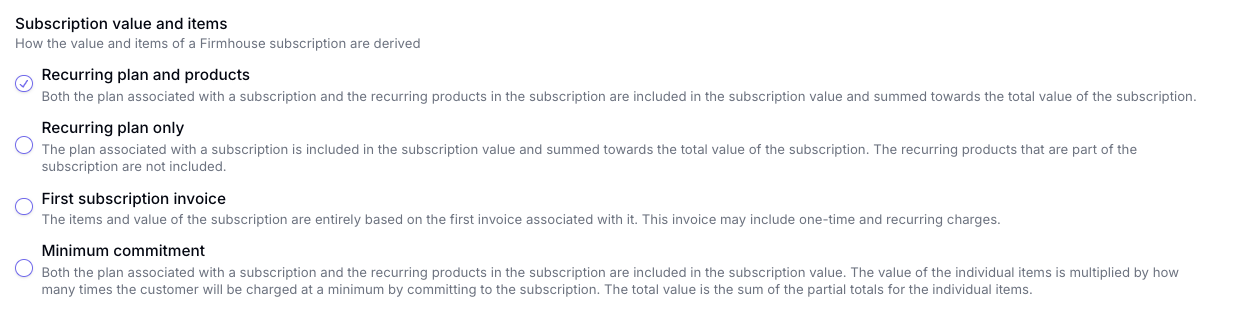
    10. Review the options and pick how the subscription value of the `Started Subscription` event in Converge should be calculated. If you are unsure, ask your contact at Firmhouse for a recommendation.
            <Frame>
              <img src="https://mintcdn.com/converge/ecGnucKsPgTlQzkL/images/sources/firmhouse/subscription-value.png?fit=max&auto=format&n=ecGnucKsPgTlQzkL&q=85&s=3d23f74244e835acd6505eb3d28d2d84" alt="subscription value" width="1233" height="310" data-path="images/sources/firmhouse/subscription-value.png" />
            </Frame>

    11. The next step depends on whether you are running Firmhouse side-by-side Shopify, or standalone.

            <Tabs>
              <Tab title="Shopify and Firmhouse">
                Choose **Shopify** as your **Product and variant ID** and make sure **Track Firmhouse invoices as Placed Order events** is turned **off**.

                <Frame>
                  <img src="https://mintcdn.com/converge/ecGnucKsPgTlQzkL/images/sources/firmhouse/shopify-parallel.png?fit=max&auto=format&n=ecGnucKsPgTlQzkL&q=85&s=5d929f790e2763b78d555f2c84f54ce4" alt="" width="490" height="146" data-path="images/sources/firmhouse/shopify-parallel.png" />
                </Frame>
              </Tab>

              <Tab title="Only Firmhouse">
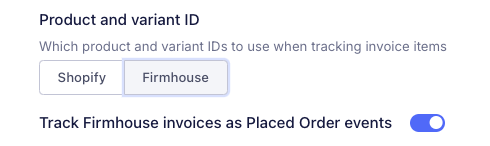
                Choose **Firmhouse** as your **Product and variant ID** and make sure **Track Firmhouse invoices as Placed Order events** is turned **on**.

                <Frame>
                  <img src="https://mintcdn.com/converge/ecGnucKsPgTlQzkL/images/sources/firmhouse/firmhouse-only.png?fit=max&auto=format&n=ecGnucKsPgTlQzkL&q=85&s=c70f28a99a677b63bb340592ad7a11f6" alt="" width="490" height="146" data-path="images/sources/firmhouse/firmhouse-only.png" />
                </Frame>
              </Tab>
            </Tabs>

    12. You can ignore shipment date and leave Start Date blank and click on **Create Source**.
  </Step>
</Steps>

***

## Event spec

This integration auto-tracks the following events on the server with all properties available according to the [Converge event spec](/sources/converge-spec).

| Event Name                                                          | Event Description                      |
| ------------------------------------------------------------------- | -------------------------------------- |
| [Started Subscription](/sources/converge-spec#started-subscription) | When a customer starts a subscription. |
| [Placed Order](/sources/converge-spec#started-subscription)\*       | When a customer places and order.      |

\*Only when configured in the Source configuration.

### Sales channels

More on sales channels can be found [here](/sources/concepts/sales-channels).

An example of how Converge map Firmhouse events:

| Firmhouse             | Converge Mapping              | Description                                                                                                                      |
| --------------------- | ----------------------------- | -------------------------------------------------------------------------------------------------------------------------------- |
| Started Subscription  | web                           | New subscription triggered                                                                                                       |
| Placed Order          | web or subscription\_contract | Recurring placed order events are mapped to "subscription\_contract" while first time and one time purchases are mapped to "web" |
| Placed Shipment Order | offline                       | Placed shipment orders                                                                                                           |
