

Placed Order, Converge forwards a revenue value to the destination. The Conversion amount setting controls which revenue value is sent. For example, you can pick whether to include or exclude taxes and shipping.
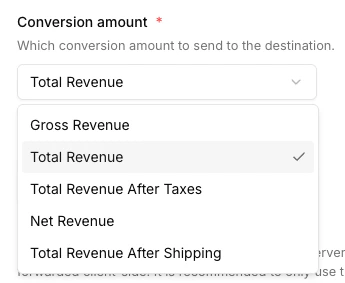
Available values
See the Metric dictionary for the formal definitions.
Configure the conversion amount
The setting is applied per destination and covers every conversion event forwarded to it.- Navigate to the Destinations tab and click the destination you want to configure.
- Click on Configuration.
- Open the Advanced configuration (optional) section.
- Pick your desired Conversion amount and click Save.
Availability of shipping and tax values depends on the source. Orders from shop platforms like Shopify and WooCommerce include both; orders from custom server-side integrations include them only when you send them in the event payload.